Staff Retiring This Year? Capture What They Know in Your Internal Wiki Before They Go
How to do knowledge transfer before retirement: what to capture first, a 45-minute interview template, a wiki page template, short videos for machine work and a 90-day plan.

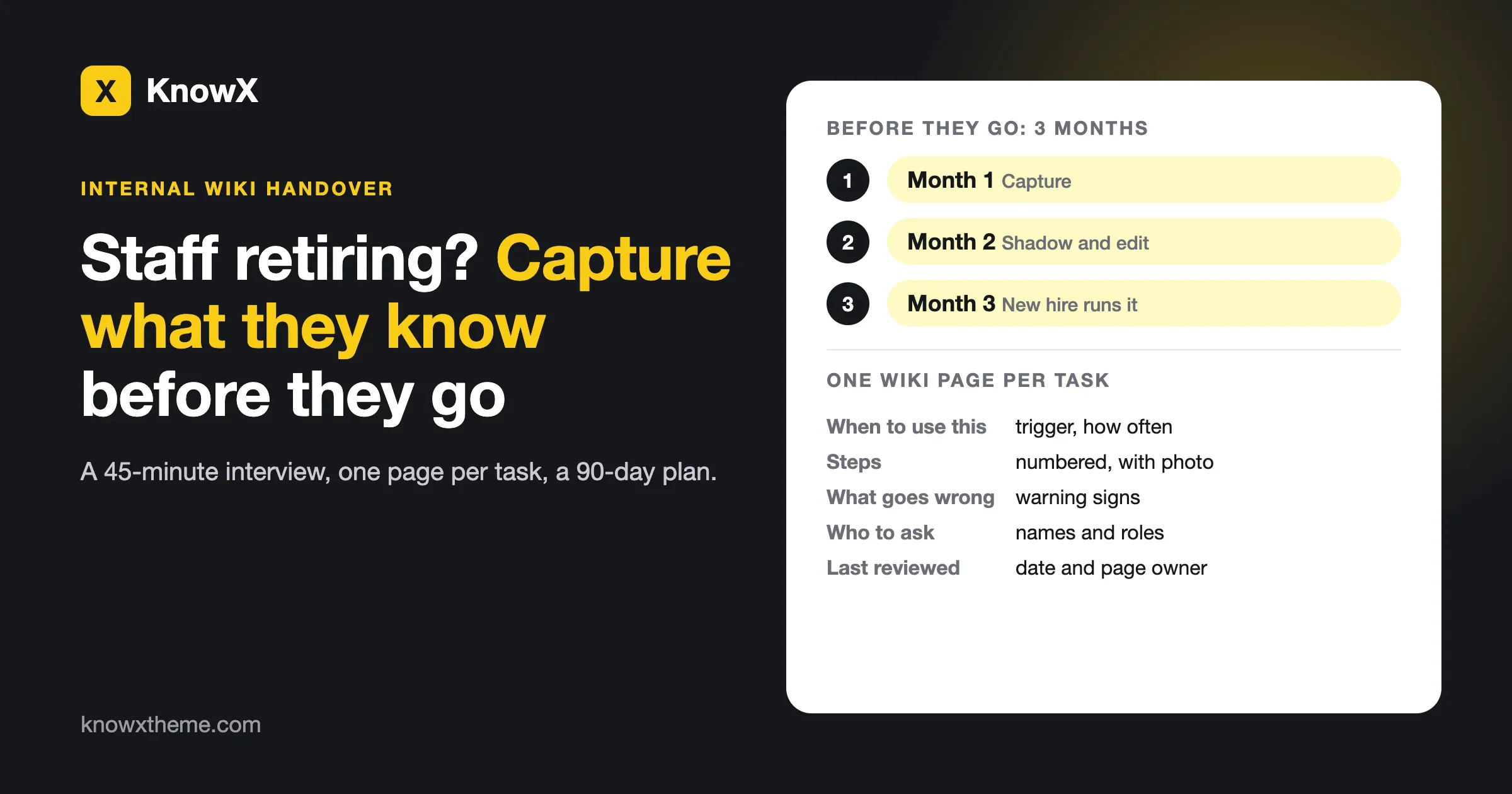
For knowledge transfer before retirement, start three to six months before the last day. Capture decisions and exceptions, not only steps. Write one wiki page per task. Record a short video for anything done with hands or a machine. Give every page a named owner who is not the person leaving.
That is the whole method for knowledge transfer before retirement. The rest of this post shows how to run it in an ordinary working week, with a copy-paste interview script, a page template and a 90-day plan you can start on Monday.
A manufacturing company asked online this week how to train new hires on complex machines while its most experienced operators retire this year. Smaller teams ask the same thing in other words: how do we stop what one person knows from walking out of the door? The answer is the same for a factory floor, a three-person bookkeeping firm or a shop with one person who understands the stock system.
Why does knowledge transfer before retirement fail when you ask people to write it down?
Because the people who know the most are usually the worst at writing it. Someone who has run the same machine for thirty years does not think in steps any more. Their hands know what to do. If you hand them a blank page and a deadline, you get a thin document that says what the manual already says.
What you need is the part the manual leaves out. The sound the motor makes before it jams. The supplier who ships on Thursdays, so you never order on Friday. The reason the second valve is always opened first. Researchers call this tacit knowledge: things a person knows but would never think to mention.
You get it out with questions, not with a writing assignment. One person asks, another writes. The expert talks, usually at the machine or the desk where the work happens. Then you shape the notes into pages afterwards. The expert only has to talk and correct.
What should you capture first?
You will not capture everything. Do not try. A retiring person may hold hundreds of small facts, and most of them are findable elsewhere or easy to relearn. Rank the work by what hurts if it is lost, and go down the list in this order.
- Things only this person knows. Test question: if they were off sick for a month, who could do this? If the answer is nobody, it goes first.
- Safety-critical steps. Lockout, isolation, chemical handling, anything where a wrong move hurts someone. These need the expert, a second person and a manager all in the room.
- Things that break rarely. The year-end close. The annual inspection. The fault that appears twice a decade. Nobody remembers these, so nobody will find them by trial and error either.
- Supplier and customer contacts with their quirks. Not just a phone number. Who answers, who actually decides, what they care about, what went wrong last time.
- Workarounds and settings that are not in any manual. The tweak that makes machine four behave. The report you run twice because the first run is always wrong.
Notice what is not on the list: the daily routine everyone already shares. If three other people do it every week, it can wait. Spend the expert’s limited hours on the knowledge that exists in one head.
A fast way to build the list
Ask the retiring person to spend half an hour listing every task they do in a month, and the odd ones they do once a year. Do not ask for detail. Just titles. Then sit down together and mark each one with the test questions above. You will usually end up with 15 to 30 titles. That is your capture list, and each title becomes one wiki page.
Add a column for how often the task happens and one for how bad it is if it goes wrong. A task that happens once a year and costs a day of lost output goes above a task that happens daily and that three people already know.
What is the best way to interview someone about their job?
For knowledge transfer before retirement, use a fixed, short session. Forty-five minutes is long enough to cover one task properly and short enough that nobody gets tired or starts to wander. Book several of them across the weeks, one task each, ideally at the place where the task happens.
Some ground rules before you start:
- Two people attend. One asks and keeps the conversation moving. The other types or writes and does not interrupt.
- Ask the expert before you record anything. Audio or video of a person is personal data in many countries, and people relax when they know what happens to it.
- Do the task, or stand beside it, rather than sit in a meeting room. Memory is tied to place. A person at the machine remembers things they cannot recall at a table.
- Ask the new hire or the successor to be the one who asks. Their questions are the right ones, because they are the ones the next person will have.
The 45-minute interview template
Copy this block into a document and fill it in per task. The timings are a guide.
Task: (name of the task, verb first, for example Restart the line after a power cut)
Interviewee / Interviewer / Note-taker / Date:
0 to 5 min, set the scene. When do you do this task? How often? What does a good result look like?
5 to 20 min, walk me through it. Show me from start to finish, as if I were doing it tomorrow. What do you check before you begin? What do you do first, and why that first?
20 to 30 min, what goes wrong. What is the most common mistake? What did you get wrong the first time you did it? What does a bad sign look like, sound like, smell like? What do you do when it happens?
30 to 38 min, the exceptions. When do you not follow the usual steps? Which customer, supplier, season or machine is different? Which rule is written down that you ignore, and why?
38 to 43 min, who and what else. Who do you call when it goes wrong? Which parts, tools, logins or documents do you need? Where are they kept?
43 to 45 min, last question. If I could only remember one thing from today, what should it be? What did I not ask that I should have?
The last question is the one that pays off. People often save the most useful detail for it, once they feel the interviewer understands the job.
Why decisions matter more than steps
Steps are the easy part. Anyone can follow step six when it is written down. What the new person cannot do is decide what to do when step six does not work. So keep asking why. Why that order? Why that setting? What would you do if the reading were higher? What would make you stop and call someone?
Write the answers down as short decision rules: if you see this, do that, because of this. One line each. These rules are the real value of the page. They are also what the retiring person can check in a few minutes, which keeps their review workload small.
How do you turn interview notes into wiki pages?
Within two days of each interview, while the details are fresh, write the notes into one wiki page for that one task. One page per task. If the page needs two different titles to describe it, it is two tasks. Splitting them makes each page short enough that a new person will read it while standing at the machine.
Use the same page template every time. The point is that anyone can find the same section in the same place on every page. Here is the layout we suggest.
- Title. Verb first. Restart the line after a power cut. Reconcile the supplier invoices. Not Power cuts or Invoices.
- When to use this. One or two sentences on the trigger and how often it comes up.
- Before you start. Tools, parts, access, who else must be told.
- Steps. Numbered, one action per line. Add a photo or a link to a short video where the words are not enough.
- Decision rules. If you see this, do that, because of this.
- What goes wrong. The mistakes and warning signs the expert named, with what to do about each.
- Who to ask. Names, roles and when to call them. Include outside contacts and their quirks.
- Last reviewed. A date and the name of the person who checked the page.
- Page owner. One named person responsible for keeping it correct.
A short worked example
This is an invented example to show the shape. It is not from a real customer.
Restart the line after a power cut
When to use this: After any unplanned loss of power longer than a few seconds. Roughly twice a year.
Before you start: Torch, the red logbook, the shift lead’s mobile number.
Steps: 1. Check the panel is clear of alarms. 2. Reset the main isolator. 3. Bring up the compressor and wait for full pressure. 4. Start the conveyor empty. 5. Run two test cycles before loading product.
Decision rules: If pressure takes longer than ten minutes, stop and call maintenance, because a slow build usually means a leak. If the first test cycle jams, do not clear it by hand until the isolator is off.
What goes wrong: People load product before the test cycles and scrap the first batch. The panel shows a false alarm for the first minute. Wait before reacting.
Who to ask: Maintenance lead for pressure faults. The supplier helpline for the controller, and ask for the senior engineer, since the first line cannot help.
Last reviewed: (date, name) Page owner: (name)
Notice how much of the page lives in the decision rules and the what-goes-wrong lines. That is the knowledge that was only in someone’s head. A standard operating procedure on its own would have stopped at the numbered steps. If you want a fuller template for the steps themselves, we cover it in our guide to writing SOPs your team actually follows.
Group pages by topic
Once you have a dozen pages, group them. Use topics a new person would look under: a machine, a department, a supplier, a time of year. Keep the list short. If a topic has more than about ten pages, split it. People find things by browsing the topic list first and searching second, so make the topic names plain words that match how people already talk.
Send the draft page back to the expert for a five-minute check. Ask only one thing: is there anything on this page that is wrong or missing? That one check catches most errors and costs very little of their time.
How do you capture work that is physical?
Words are a poor tool for physical work. How tight is tight? What does the right colour look like? Where exactly is the valve? A short photo or video answers in seconds what a paragraph cannot.
A phone is enough. Some habits that make the clips usable:
- One task per clip, 60 to 90 seconds. Longer clips do not get watched at the machine.
- Show the hands and the gauge. Frame the shot so the viewer sees what the operator sees. Hold the phone landscape.
- Let the expert talk while they work. Ask them to say what they are looking for, in their own words. Their narration is the knowledge.
- Take photos of anything with a label, dial or setting. Draw an arrow on the photo to mark the thing that matters.
- Name each file after the page it belongs to. Restart-line-step-3.mp4 is findable. IMG_4821.mov is not.
- Keep the steps in text as well. People search with words, and a video cannot be searched. The clip is a companion to the numbered steps, not a replacement.
Screen work is the same. A one-minute screen recording of how someone runs the month-end report, with their voice explaining the odd bit, saves a lot of guessing later.
A word on safety
A wiki page does not replace formal training, a supervisor or the rules that apply to your industry. For anything where a mistake can injure someone, the page should be written with the expert, checked by a second experienced person and signed off by the manager who is responsible for safety. Treat the page as a record of what you currently do and why. Your own safety rules and any regulator’s requirements still apply on top of it.
What does a 90-day knowledge transfer plan look like?
Three months is a workable minimum for one retiring person and one successor. Six months is better, because you can spread the interviews out and the expert is not rushed. If you have less, shrink the task list rather than skipping the third month. Having the new hire run the task while the expert watches is the step that proves the page works.
Month | What happens | Who does the work | Done when |
|---|---|---|---|
Month 1: capture | Build the task list. Run one 45-minute interview per task. Record clips at the machine. Write a first draft page within two days of each interview. | Interviewer and note-taker lead. Expert talks and checks. | Every top-priority task has a draft page. |
Month 2: shadow and edit | The successor follows the expert through real work using only the pages. Every time they get stuck or the expert says no, not like that, the page is fixed the same day. | Successor follows. Expert corrects. Page owner edits. | The successor can name what is missing from each page, and the list is short. |
Month 3: new hire runs it | The successor does the task from the page while the expert watches and says nothing unless it goes wrong. Note every time the expert steps in. | Successor performs. Expert observes. | Each task is done correctly from the page alone. Pages carry a review date and an owner. |
The silent observation in month 3 is the test that matters. Whenever the expert has to speak, a page is missing something. Fix it before they leave, while you can still ask.
How long does knowledge transfer take?
It depends on how many tasks sit with the person, but plan for three to six months of part-time effort. Expect roughly one hour of the expert’s time per task for the interview, a short review afterwards and some time at the machine for the clips. A person with twenty priority tasks needs something like thirty hours of their time over the period. That is a guide from how these sessions run, not a measured figure, so adjust it against your first two or three interviews.
How do you keep the pages alive after they leave?
This is where most capture projects fail. The pages are written, everyone feels relieved, and two years later half of them are out of date and nobody trusts any of them. Prevent that with three small rules.
- Every page has one owner, and it is not the person leaving. Pick the person who will do the task next. Their name sits on the page. When they move on, ownership moves to someone else on the day, not later.
- Every page has a review date. Twelve months is a sensible default, and six for anything that changes often, such as supplier contacts or software steps. Put the date on the page and keep a short list of pages due this month.
- Every question gets a fix. When a new person asks something the page should have answered, the page is updated within the week. Keep a short log of these. After a few months you will see which pages are weakest.
Set a monthly half hour for the owners. They look at what is due for review, close the questions log and retire pages for tasks that no longer exist. It is a small habit, and it is the difference between a wiki and a graveyard.
If the retiring person is willing, agree in advance whether they can be reached for questions after they leave, and how. Make it their choice, put it in writing and treat it as a courtesy, not a duty. Many people are glad to help with an odd question. Do not build your plan around it.
A register page for the odd things
Some knowledge is not a task. It is a list: the tools in use, the logins held by one person, the licences and renewal dates. A single register page handles these well, with an owner and a review date like any other. We describe one version in our post on keeping an AI tool register in your internal wiki, and the same layout works for equipment, suppliers or software.
Where should you build it: WordPress with KnowX, a shared drive or a hosted wiki?
Any tool works if people use it, and the best one is the one your team already opens every day. Here is how the common options compare for this particular job. We make KnowX, so weigh what we say about it with that in mind, and note where we list its limits.
Option | What suits it | Where it falls short |
|---|---|---|
Shared drive (folders of documents) | Zero setup. Everyone already has it. Fine for storing the raw interview notes and clips. | Search is mostly by file name. No fixed page layout, no obvious topic list, no sign that a document is out of date. Documents drift into copies of copies. |
Hosted wiki or notes tool such as Notion | Quick to start and pleasant to write in. Good for live collaboration. | You pay per seat on most plans, and your content lives on someone else’s platform. Check the vendor’s own pricing and export pages on the day you decide, since they change. |
WordPress with the KnowX theme | Free theme, GPL v3, self-hosted, so the pages stay on a site you own. Articles are ordinary WordPress posts grouped by category, so each category is a topic. WordPress keeps revisions of every post, so you can see and restore earlier versions. | It is a theme, not a collaborative editor, so two people do not edit one page live. It has no per-article or per-role access settings, no voting, no search analytics and no AI answers. Hosting and a domain are your cost. |
For knowledge transfer before retirement, three things in the third row matter. Your page template becomes a simple post you can reuse by copying. Photos and short clips go into the page with the block editor you already know. And topic grouping comes from categories, so the machine, department and supplier topics from your plan map straight onto the home page. KnowX has two home page layouts: one with a search box and a tile for each top-level topic, and one that lists every topic with its articles on a single page.
Keeping it staff-only
Pages about machines, suppliers and settings are usually not for the public. KnowX does not restrict access by itself. To make the site private, you need a WordPress plugin or a server rule that makes every visitor log in first. Different people seeing different sections needs a membership or access plugin, or custom work. We cover the options on our internal knowledge base page. If you want a longer comparison with other wiki tools and what each costs, read our Confluence alternatives comparison for small teams, which was checked against each vendor’s own page on 21 November 2026.
If you also want short lessons
Some teams want the captured knowledge turned into step-by-step lessons with a quiz at the end, so a new hire can be tested rather than only given pages to read. That is a different job from the wiki, and Learnomy, our WordPress learning platform, is built for it. See learnomy.app. Build the wiki pages first, because the lessons draw on them.
Frequently asked questions
How do you transfer knowledge before someone retires?
Start three to six months out. List the tasks only that person knows, then interview them about one task at a time in 45-minute sessions, ideally at the place where the work happens. Turn each interview into one wiki page within two days, add photos or short videos for physical work, and have the successor follow and then perform the task from the pages while the expert watches.
What should a knowledge transfer plan include?
A ranked list of tasks, with safety-critical and only-one-person tasks first. A named interviewer and note-taker. A fixed interview script. A page template with steps, decision rules, what goes wrong, who to ask, a review date and an owner. A three-month schedule that ends with the new hire running the task while the expert observes. And a plan for who owns and reviews each page afterwards.
How long does knowledge transfer take?
Plan three to six months for one person who holds many tasks, with part-time effort from the expert. Allow about an hour of their time per task, plus the shadowing period. If you have less time, cut the task list to the riskiest items. Do not skip the final stage where the successor runs the task from the page, since that test shows what is still missing.
What is the best tool for capturing team knowledge?
The one your team will actually open and keep up. A shared drive is fine for raw notes and recordings. A wiki is better for the finished pages, because it gives you a fixed layout, topics and search. If you want a free, self-hosted option on WordPress, KnowX is ours, with the limits listed above. Whatever you pick, the page template and the owner and review habits matter more than the software.
Start with one task this week
You do not need a big project to begin. Pick the single task that would hurt most if it were lost. Book 45 minutes with the person who knows it. Bring someone to take notes. Write the page that week, and send it back for a five-minute check. Then do the next one.
When you are ready to put the pages somewhere your team can find them, see how KnowX handles a team wiki on WordPress, or ask us about setting up a private one.