Confluence Alternatives for a Small Team: Self-Hosted Wiki on WordPress vs Notion and SaaS
Confluence alternatives for a small team, compared on price and fit: WordPress with KnowX, Notion, Slab, Nuclino, Document360, BookStack and Wiki.js. Plus how to export from Confluence. Checked 21 November 2026.

For a small team leaving Confluence, our pick is a self-hosted knowledge base on WordPress with the free KnowX theme. KnowX is made by our team at Wbcom Designs, so read this with that in mind: we built it for teams that want their docs on their own site, in ordinary WordPress posts they can take anywhere, with no per-person bill. If your team needs several people typing in the same page at once, databases or a tool nobody has to maintain, Notion or Slab fits better. If you want a dedicated open-source wiki with its own permission system, look at BookStack or Wiki.js.
Below we compare eight options on what a small team actually needs, show what each one costs a 15-person team, explain how to get your pages out of Confluence, and list the problems people run into on the way. Every price and limit was read on the vendor’s own page. Checked on 21 November 2026.
Why are small teams looking for a Confluence alternative now?
Two things push people out: the end of Confluence Data Center, and per-user pricing on Confluence Cloud.
Confluence Data Center has an end date
Atlassian’s Data Center end-of-life page sets out three dates, and Confluence Data Center is on the list of affected products:
- 30 March 2026: new customers can no longer buy Data Center subscriptions or new Marketplace Data Center apps.
- 30 March 2028: existing customers can no longer buy new subscriptions, expansions or upgrades. Renewals for current users and apps continue.
- 28 March 2029: end of life. Subscriptions expire and Data Center products become read-only. Technical support, critical security fixes and the connectors to Atlassian Cloud stop on that date.
After that date your data is still readable but nothing gets fixed, and Atlassian advises against keeping the read-only product connected to the internet. Its recommended path is Atlassian Cloud. For a team of ten or twenty that chose self-hosting on purpose, this is the moment to ask whether Confluence was ever the right size.
Confluence Cloud is priced per user
The Confluence pricing page lists four plans. On 21 November 2026 it showed:
- Free: up to 10 users, 2 GB of file storage, community support.
- Standard: $7.15 per user per month for a 15-user team on monthly billing. Adds free guest access, advanced permissions, 250 GB of storage and Atlassian’s Rovo AI features.
- Premium: $14.10 per user per month at the same team size. Adds unlimited storage, admin insights and a 99.9% uptime SLA.
- Enterprise: billed annually, contact sales.
The per-user price changes with team size and billing period. When we left the calculator at its default of 300 users, Standard showed $5.78. Annual billing saves up to 17%, according to the same page. So a 15-person team on Standard, billed monthly, pays about $107 a month, and the bill grows with every hire.
That is fair for what Confluence does, but many small teams use only a page tree, search and a few templates.
What should a Confluence replacement do for a small team?
Write down what your team uses Confluence for today. A small team usually needs six things:
- Structure. Spaces and a page tree, or an equivalent: products, sections, books, topics.
- Search that finds the page. Fast, and ideally limited to one area when two areas share words.
- Who can see what. Staff-only content, and sometimes one section that only managers or one department may read.
- Who can edit. Writers, reviewers and readers. Some teams also need several people editing one page at the same time.
- History. Who changed what, and a way back to the old version.
- A way out. An export you can open without the tool, so the next move is not as painful as this one.
Score each option below against those six. We go deeper on the same checklist, with a scorecard, in our guide to internal knowledge base software and what a small team can self-host.
Which Confluence alternatives are worth a look?
Here are the eight options side by side. Prices are per user per month, read on each vendor’s page on 21 November 2026.
Option | Type | Free tier | Paid from | Real-time co-editing | Best for |
|---|---|---|---|---|---|
WordPress + KnowX (made by our team) | Self-hosted theme | Theme is free | No per-user fee; you pay hosting | No | Teams who want docs they own on their own site |
Notion | Hosted workspace | Yes, limited for 2+ members | $10 (yearly) or $12 (monthly) | Yes | Teams who also want databases, projects and notes |
Slab | Hosted wiki | Up to 10 users | $6.67 (annual) or $8 (monthly) | Yes | Teams who want a clean hosted wiki and nothing else |
Nuclino | Hosted wiki | Up to 50 items | $6 (yearly) or $8 (monthly) | Yes | Small teams who like boards and graph views |
Document360 | Hosted docs platform | None listed | Quote only | Not checked | Customer-facing product docs with analytics |
BookStack | Self-hosted open source (MIT) | Free | No licence fee; you pay a server | No | Teams who want a wiki with roles and permissions on their own server |
Wiki.js | Self-hosted open source (AGPL-3.0) | Free | No licence fee; you pay a server | Not checked | Technical teams comfortable with Node.js and PostgreSQL |
WordPress + a KB plugin | Self-hosted plugin | Free versions exist | Varies by plugin | No | WordPress sites that need voting or analytics on articles |
1. WordPress with KnowX: our pick for a small team that wants to own its docs
Disclosure: KnowX is made by our team. It is a free theme on WordPress.org. Version 2.0.0, updated on 19 October 2026, needs WordPress 6.9 or newer and PHP 8.1 or newer.
KnowX turns an ordinary WordPress site into a docs site. Your top-level categories become product cards on the docs home, the categories under them become sections, and your articles are normal WordPress posts. That last point is the reason we recommend it to teams leaving Confluence: there is no custom content format to get stuck in. If you leave KnowX one day, your articles are still WordPress posts.
What a team gets with KnowX 2.0.0:
- A section tree beside each article, an “On this page” list and a Ctrl+K (Cmd+K) search that can be limited to the current product.
- An Article Order field, so “Getting started” reads 1, 2, 3 instead of by publish date.
- A “last updated” date on every article, so readers can tell whether the steps are fresh.
- Six starter layouts (getting started, troubleshooting, API endpoint, docs home, FAQ, changelog entry) and 17 block patterns, so every writer formats a page the same way.
- An “applies to version” badge for products that change over time.
- Light and dark mode, and optional sample docs so you can see the structure before you import.
WordPress itself adds user roles, revisions on every post and a standard export file.
What KnowX does not do. We would rather you hear this from us than find it after the move:
- No real-time co-editing. WordPress locks a post while one person edits it. Real-time collaboration was tested for WordPress 7.0 but did not ship in it, and work on it continues. If your team writes pages together live, this is the biggest gap.
- No per-article access roles. KnowX does not hide one article from one group. Making a whole site staff-only needs a members-only plugin or a login at server level.
- No article voting, no search analytics, no AI answers, no ticketing. These come from separate WordPress plugins if you need them.
- You run it. Hosting, updates, backups and security are yours, a real cost even if it is not on an invoice.
- No Confluence importer. Moving pages in is a project, covered further down.
Who it fits: a team of 5 to 50 that mostly reads and occasionally writes, wants its docs on its own domain, and has someone who can keep a WordPress site updated. You can try it in a browser first with the KnowX WordPress Playground demo, no install needed.
2. Notion: the closest all-rounder if you want hosted
Notion is a hosted workspace for docs, databases, projects and notes. Real-time editing works well, and it can replace more than Confluence.
From the Notion pricing page:
- Free: $0, but pages and blocks are “limited for 2+ members”, page history is 7 days and file uploads are capped at 5 MB.
- Plus: $10 per member per month billed yearly, $12 billed monthly. 30 days of page history.
- Business: $20 billed yearly, $24 monthly. Adds private teamspaces, SAML SSO, granular database permissions and 90 days of page history.
- Enterprise: custom pricing.
Notion has a documented Confluence importer, which is the strongest point in its favour for a move. Its help page lists two routes. A zip importer takes an HTML space export for workspaces up to 5 GB (15 GB on request) but does not bring comments. An API importer takes the whole workspace, up to 30 GB, keeps comments and maps users. Importing up to 10 spaces at once through the interface is limited to Business and Enterprise.
The cons: per-person pricing again, so you swap one growing bill for another. Its help page says permissions, page history and most macros do not come across. And without house rules, a Notion wiki can sprawl the same way Confluence did.
3. Slab: a focused hosted wiki
Slab does one job: a team wiki with good search. The Slab pricing page showed:
- Free: up to 10 users, 90 days of version history, 10 MB attachments.
- Startup: $6.67 per user per month billed annually, $8 monthly. 3 guests per user, 365 days of version history.
- Business: $12.50 billed annually, $15 monthly. 5 guests per user, unlimited history, SAML SSO, audit logs and a GraphQL API.
The cons: its FAQ says there are no read-only users; billing counts everyone who can log in. Private topics and custom domains are on paid plans. And it is hosted only, so the question “who holds our data?” has the same answer as with Confluence Cloud: the vendor.
4. Nuclino: light and quick
Nuclino is a lightweight hosted wiki with list, board, table and graph views. From the Nuclino pricing page:
- Free: up to 50 items (documents) and 3 canvases, 2 GB total storage.
- Starter: $6 per user per month billed yearly, $8 monthly. Unlimited items, 30-day version history, 10 GB storage per user.
- Business: $10 billed yearly, $12 monthly. Adds its AI assistant, audit log, SAML SSO and unlimited history.
The cons: the 50-item free limit is low for any team moving a real Confluence space; you will be on a paid plan from day one. Nuclino’s FAQ also counts guests and read-only members as users, and upgrading upgrades the whole team.
5. Document360: when the docs are for customers
Document360 is a documentation platform aimed at help centers and product docs, with analytics, translation, an AI assistant and a migration service. Its pricing page does not show flat prices; it walks you through a short form and quotes a custom plan.
The cons: no published price makes it hard for a small team to budget, and it is built for public, customer-facing docs more than a staff wiki. If your Confluence space was really a customer help center, this kind of tool belongs on your list, alongside our comparison of a self-hosted knowledge base and a SaaS help center.
6. BookStack: the self-hosted wiki many people name first
BookStack describes itself as a simple, self-hosted platform for organising information, “fully free and open, MIT licensed”. Content sits in books, chapters and pages. It has a WYSIWYG editor with an optional Markdown editor, a full role and permission system, page revisions and search across everything.
The installation docs ask for PHP 8.2 or newer and MySQL 8.0 or MariaDB 10.6 or newer, plus Composer and Git. The latest release we found was v26.09.3, published on 11 November 2026.
The cons: it is a separate application, not your website, so you run a server for it. The structure is fixed (books, chapters, pages), which suits most teams but frustrates some. We did not find an official Confluence importer, so expect a scripted or manual move.
7. Wiki.js: modern, powerful, more to run
Wiki.js is an open-source wiki under the AGPL-3.0 licence. Its 3.x line is moving fast: version 3.5.0, released on 20 November 2026, added a Confluence import utility, along with DokuWiki and XWiki importers. We have not tested that importer, so treat it as new.
The current requirements page is strict: Node.js 26 (“earlier versions are not compatible”), PostgreSQL 17 or 18 only, at least 1 GB of RAM, and a dedicated domain or subdomain (subfolder installs are not supported).
The cons: this is a developer’s tool to host. If nobody on your team is comfortable with Node.js, PostgreSQL and Docker, it will be the thing that breaks while that person is on holiday.
8. WordPress with a knowledge base plugin
If your team already runs WordPress and needs article voting, search analytics or access rules per article, a knowledge base plugin such as BetterDocs, Echo Knowledge Base or Heroic KB adds them. We compared those three, with versions and prices, in our post on the best WordPress knowledge base plugins, so we will not repeat it here. The short version: a plugin adds features, a theme like KnowX gives you the reading experience, and some sites use both.
What does each option cost a 15-person team?
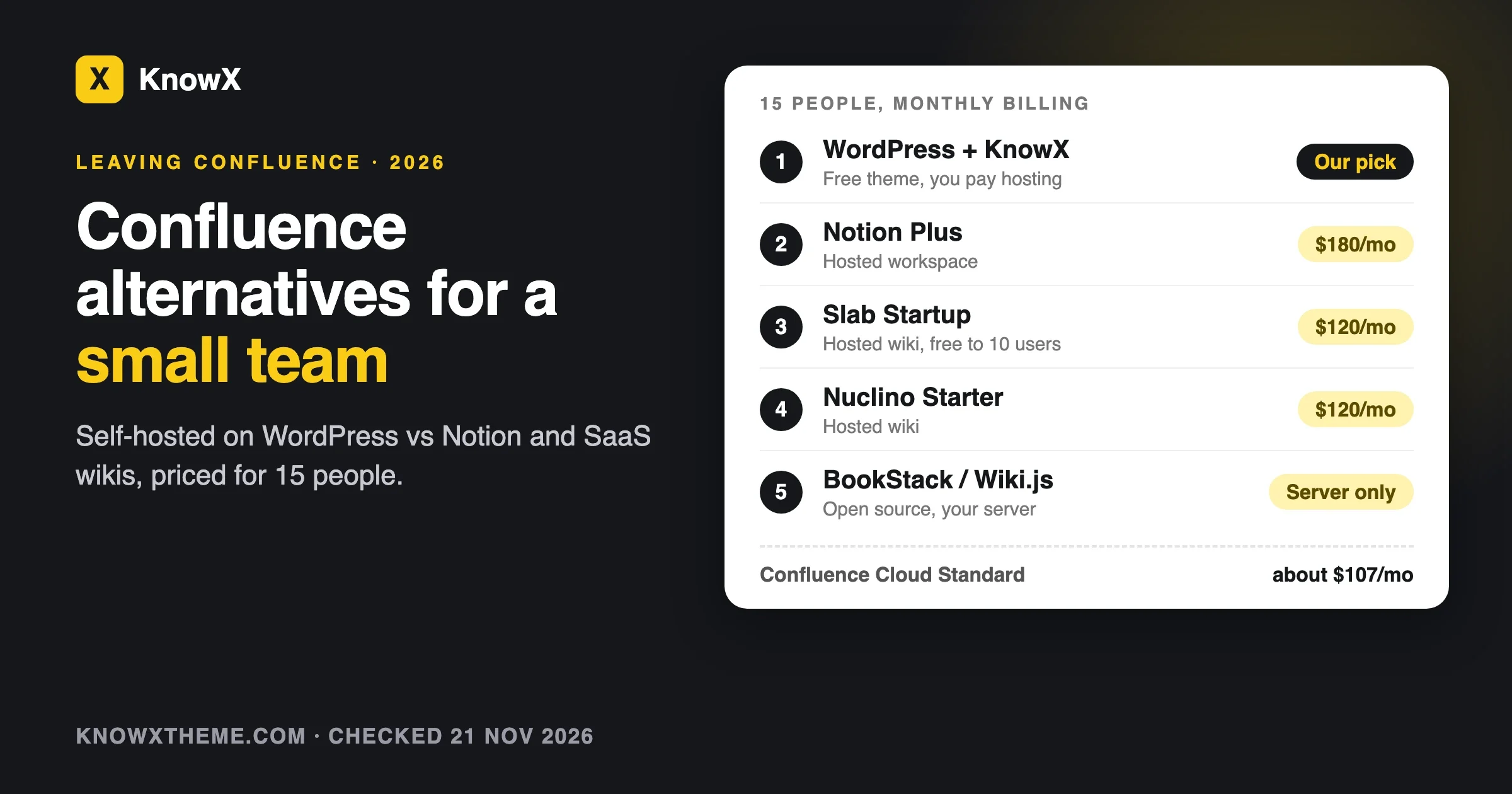
Here is the same team of 15 on each option, at the prices listed above. Monthly billing first, because that is what a team trying something out usually starts on.
Option and plan | Monthly billing | Annual billing, per month | Notes |
|---|---|---|---|
WordPress + KnowX | Hosting only | Hosting only | Theme is free. Add a members-only plugin if you need one. |
Confluence Cloud Standard | About $107 | Up to 17% less | $7.15 per user at 15 users |
Notion Plus | $180 | $150 | Business: $360 monthly, $300 yearly |
Slab Startup | $120 | About $100 | Free if you stay at 10 users or fewer |
Nuclino Starter | $120 | $90 | Free plan stops at 50 items |
Document360 | Quote | Quote | No public price |
BookStack | Server only | Server only | Free software, you host it |
Wiki.js | Server only | Server only | Free software, needs PostgreSQL |
The self-hosted rows are not free: someone spends time on updates and backups. The hosted rows rise with every hire. At 15 people the gap is small. At 40 it is not.
How do you export your content from Confluence?
Start here, before you pick a tool, because what you can get out decides how hard the move is. Atlassian’s help page on exporting Confluence Cloud content says:
- Space admins can export a whole space, or selected pages in it, to PDF, CSV, HTML or XML. CSV, HTML and XML come as a zipped archive. PDF is a single file.
- Word export works for single pages, live docs and blog posts only, not whole spaces.
- You only export what you can see, except CSV or XML exports run by a site admin, which include everything.
- HTML exports do not include page comments, and PDF exports never include comments. CSV includes comments and attachments by default.
- Blog posts are not included in PDF or HTML space exports.
- Team Calendars are not exported.
For a move to WordPress, BookStack or most other tools, the HTML export is the one you want, with page attachments in folders. Run it once now and open a few files. Macros are where the surprises hide.
If you are on Data Center rather than Cloud, the menus differ, so check the Data Center docs for your version. We have not walked through a Data Center export for this post.
How do you move Confluence pages into a WordPress knowledge base?
There is no one-click Confluence importer for WordPress that we have tested, so plan it as a small project. Our step-by-step guide on moving a knowledge base off a hosted tool covers the full order of work. The short version for Confluence:
- Take stock. List your spaces and archive what nobody has opened in a year.
- Map the tree. Each space becomes a KnowX product (a top-level category), parent pages become sections (child categories) and pages become posts.
- Export to HTML and keep the zip as your backup.
- Clean the files so only the page content is left, without the Confluence header and footer.
- Import a small batch on staging and check it in the browser.
- Upload images and fix links that still point at Confluence.
- Redirect old addresses you control and freeze the old space so nobody keeps editing it.
For step 5, WordPress’s command-line tool can create one draft post per cleaned HTML file. This is a starting point for whoever does the import, not a finished migration script:
# Run on a STAGING copy, from the folder that holds your cleaned HTML pages.
# 12 is an example category ID: use the ID of your own KnowX product or section.
for f in ./confluence-pages/*.html; do
  title=$(basename "$f" .html)
  wp post create "$f" --post_title="$title" --post_status=draft --post_category=12
done
Check the titles before you publish, since export file names are not always page titles. Run it on staging first.
If you would rather not do this yourselves, our team does knowledge base migrations to WordPress.
Common mistakes people report when leaving Confluence
Expecting macros to survive
Confluence pages lean on macros: status labels, page includes, Jira issue lists, expand blocks. Notion’s own importer page says most macros do not import and many flatten to plain text, images or links. Other tools are no better. Fix: search your space for the macros you use most and decide, for each one, what replaces it before the move.
Losing comments without noticing
Atlassian’s export page is clear that HTML exports leave out page comments. Teams who used comments as a decision log find out after the old space is gone. Fix: copy the decisions that matter into the page itself, or keep a CSV export, which includes comments, as an archive.
Forgetting blog posts
Confluence blog posts are not part of an HTML or PDF space export, per the same Atlassian page. Team announcements and release notes often live there. Fix: list a space’s blog posts separately and export the ones you want to keep.
Assuming permissions come across
They usually do not. Notion’s import lands pages private to the person who imported them. On WordPress, KnowX has no per-article access, so a page that only managers could read in Confluence is readable by everyone who can log in, unless you add a plugin for that. Fix: list your restricted pages before the move and decide where each one lives.
Moving everything, including the junk
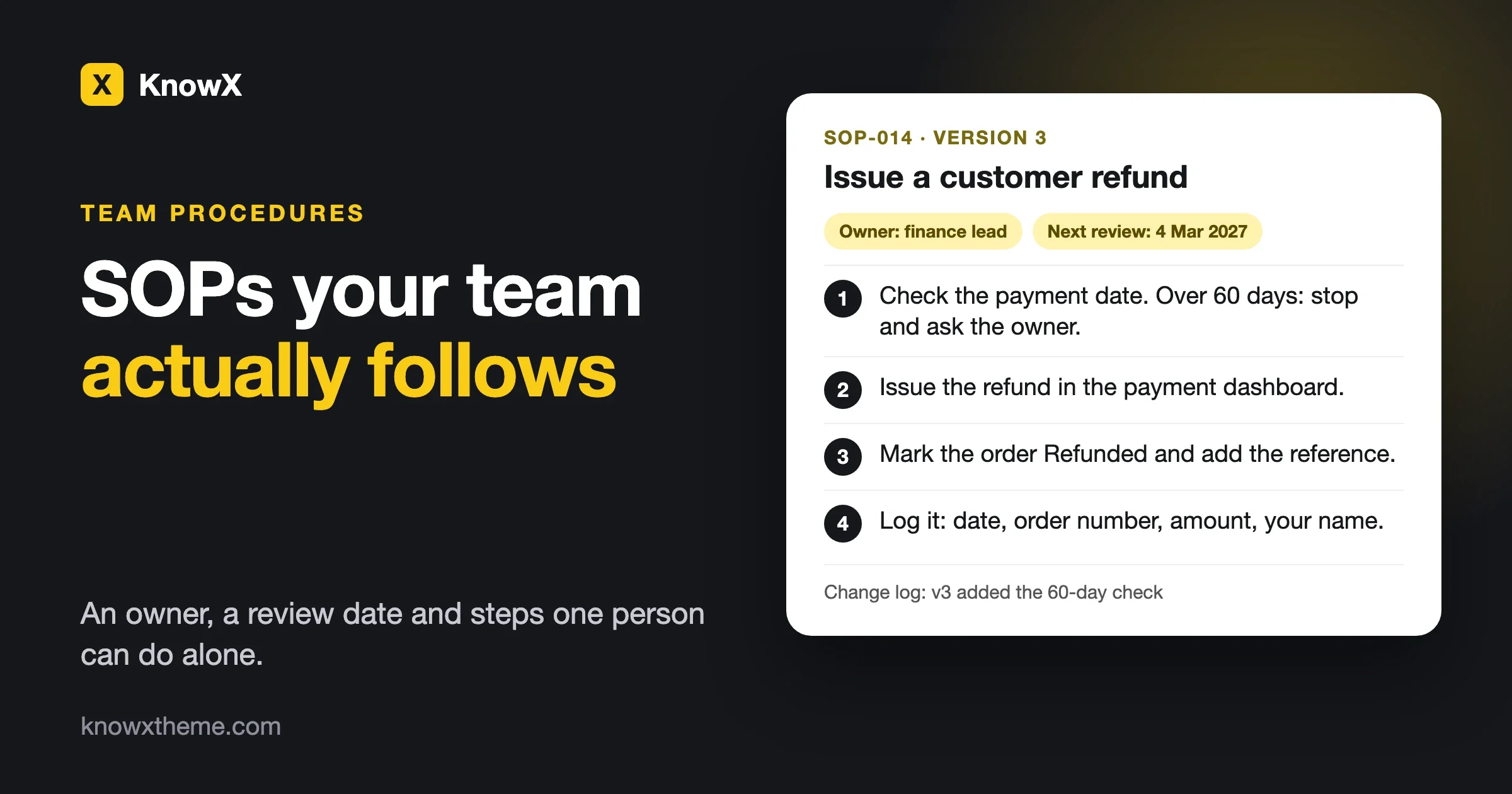
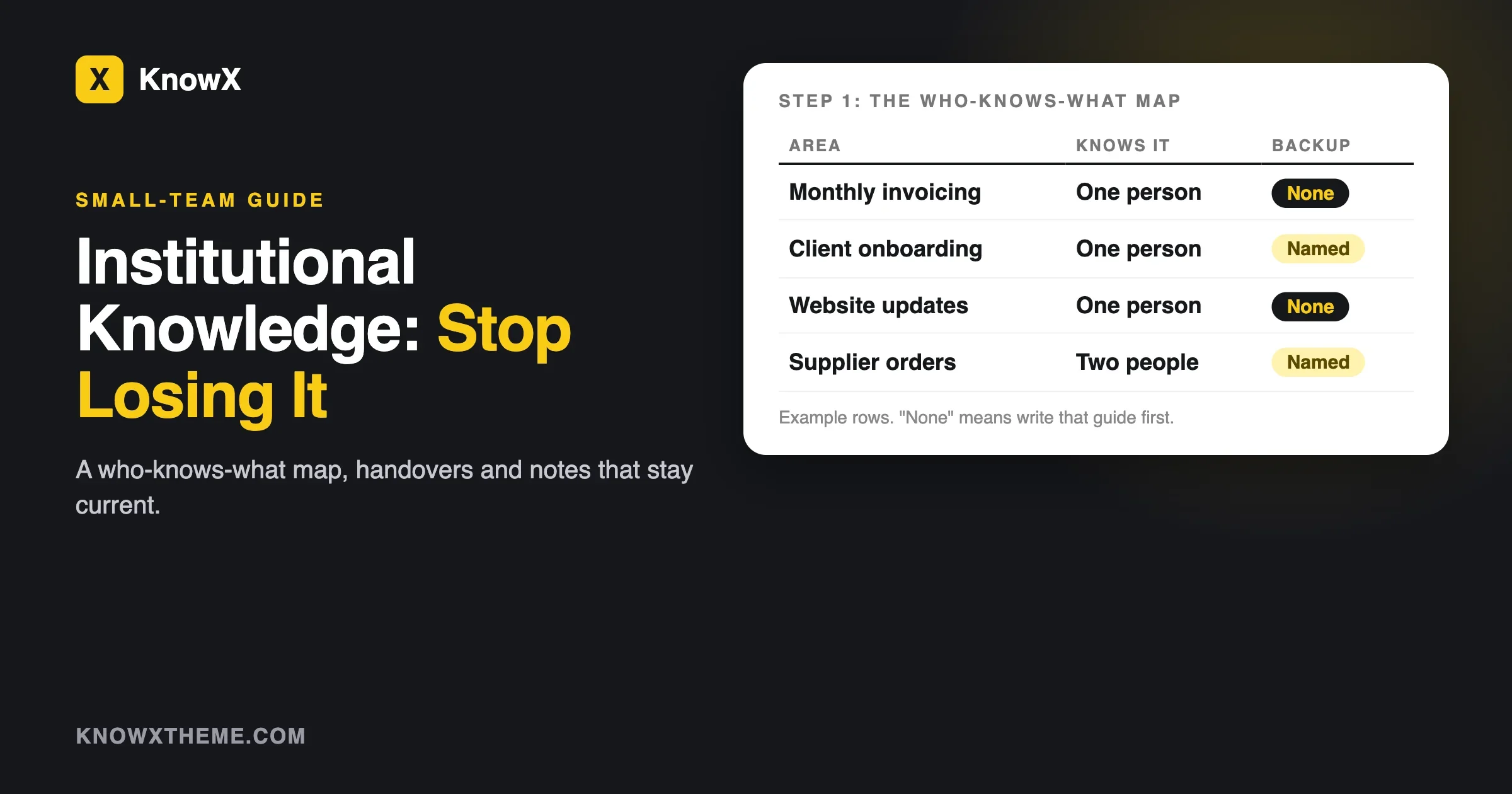
An old Confluence space carries years of stale pages. Moving them all moves the problem. Fix: give every page an owner during the move, and set a review routine like the one in our post on keeping institutional knowledge when people leave. Pages people must follow step by step deserve a proper format too; our guide to writing SOPs your team actually follows shows one.
What users say
We read the Hacker News threads where people discuss replacing Confluence. These are individual comments, paraphrased, with dates, so weigh them as experience, not as reviews.
- On why people leave (January 2023). The person who started the “Confluence on-premise is dead” thread said their 25-user team could not use cloud by law and saw no affordable on-premise path left. Several replies said they were moving to SharePoint simply because it was already in their Microsoft 365 plan, without much joy.
- On Wiki.js (January 2023). In the same thread, one commenter set up Wiki.js as a fallback during an Atlassian outage and liked that pages are stored as Markdown and can sync to a Git repository, so the content is readable even without the wiki.
- On BookStack’s size (January 2022). In a BookStack discussion, one commenter, who said they were building a competing product, argued BookStack suits a company of a few dozen people but not tens of thousands, partly because permissions were role-based rather than team-based at the time. The BookStack author replied that people use it in larger settings too.
- On self-hosted wikis in general (August 2025). In an “Ask HN: best self-hosted wiki in 2025” thread, people named Outline for collaborative editing, BookStack for its shelves-books-chapters-pages model and DokuWiki for being simple to run and upgrade. Edit conflicts and the lack of live co-editing came up as the common pain.
Nobody in these threads found a perfect Confluence clone. The happy teams picked something smaller that matched how they worked.
Our suggestion
Start with WordPress and KnowX if your team mostly reads docs and a few people write them, you want the docs on your own domain with no per-person fee, and someone can keep a WordPress site updated. You get a proper docs layout, product-scoped search and content in plain WordPress posts. Try it in the Playground demo before you decide.
Choose Notion if your team writes together live, wants databases and project tracking in the same place, and is happy to pay per person. Its Confluence importer is the most complete we read about.
Choose Slab or Nuclino if you want a hosted wiki and nothing else, and you will stay small. Slab is free up to 10 users.
Choose BookStack if you want a separate self-hosted wiki with roles and permissions, and you have someone who runs a PHP server.
Choose Wiki.js if your team is technical, already runs PostgreSQL, and wants Git-backed pages and the new Confluence importer.
Stay on Confluence Cloud if you rely on Jira links, page-level restrictions and live co-editing every day. Moving away from a tool that fits is not a saving.
Questions people ask
What is the best Confluence alternative for a small team?
For a small team that wants to own its docs, our pick is WordPress with the free KnowX theme (made by our team), because content stays in ordinary WordPress posts with no per-user fee. If you need live co-editing, Notion or Slab fits better. For a separate open-source wiki, BookStack is the simplest to run.
Is there a free alternative to Confluence?
Yes, of three kinds. KnowX, BookStack and Wiki.js are free software you host yourself, so you pay for hosting and time. Slab is free for up to 10 users. Notion and Nuclino have free plans with tight limits for teams.
Can WordPress replace Confluence?
For a reading-first team wiki or docs site, yes. WordPress has roles, revisions, search and export, and a docs theme like KnowX adds the layout. It does not do live co-editing, Jira integration or per-page restrictions without plugins.
What happens to Confluence Data Center in 2029?
On 28 March 2029 Data Center subscriptions expire and the product becomes read-only, with no support or security fixes, according to Atlassian’s end-of-life page. New sales stopped on 30 March 2026, and existing customers can buy expansions until 30 March 2028.
Can I import Confluence into Notion?
Yes. Notion’s help page describes a zip importer for HTML exports up to 5 GB and an API importer for whole workspaces up to 30 GB that keeps comments. Permissions, most macros and page history do not come across.
Does KnowX have page permissions like Confluence?
No. KnowX has no per-article access roles. WordPress user roles control who can write and edit. To make a whole site staff-only you add a members-only plugin or a server-level login.
What we could not confirm
- Whether Slab, Nuclino or Document360 offer a direct Confluence importer. We did not find one on their pricing pages and did not check further.
- How well the new Wiki.js 3.5.0 Confluence import utility works. It shipped the day before we checked.
- Confluence Cloud prices for team sizes other than 15 and 300. The price per user changes with team size.
What to do next
Run a Confluence HTML export of one space this week and open a few pages. That one hour tells you more about your move than any comparison. Then try the tool that fits your answer to the six questions at the top.
If WordPress is your answer, our page on building an internal knowledge base and team wiki on WordPress shows how the pieces fit, and KnowX is free on WordPress.org.