Institutional Knowledge: How a Small Team Stops Losing It When People Leave
Institutional knowledge meaning, why small teams lose it, and a routine to keep it: a who-knows-what map, decision log, handovers and reviews.

Institutional knowledge is everything an organisation knows that is not written down in a policy: how things really get done, why past decisions were made, who to call, and which workaround saves an afternoon. A small team stops losing it by doing five things before anyone leaves: list who knows what, write down the answers people ask for most, record the reasons behind decisions, pair people on tasks that only one person knows, and review the written notes on a schedule. This guide explains institutional knowledge meaning in plain words, why people take it with them, and a routine a small team can run without special software.
We make KnowX, a free WordPress theme that can hold a team’s written answers. It is a place to keep notes, not a system that captures them for you. KnowX has no article voting, search analytics, AI answers, ticketing or per-article access roles. Definitions come from encyclopedia articles and the employment figures from the US Bureau of Labor Statistics, read on 11 November 2026.
What is institutional knowledge? The meaning in plain words
Institutional knowledge is the know-how, history and context that live inside an organisation and its people. The Wikipedia article on organisational memory, which uses the terms organisational, institutional and corporate memory for the same idea, defines it as the accumulated body of data, information and knowledge created in the course of an organisation’s existence.
That article describes two places where this memory sits: the organisation’s archives, including its electronic databases, and the memories of individuals. It adds that most work is built around documentation, but much remains unrecorded, especially what has to do with decision-making. That unrecorded part is what people mean when they talk about losing institutional knowledge.
You may also hear it called tribal knowledge, institutional memory or know-how. In this guide we use institutional knowledge for all of them.
Examples a small team will recognise
- “Always email the supplier before noon, or the order slips a day.”
- “We stopped using that tool because of a billing problem two years ago.”
- “The invoice template looks wrong in one email program, so send a PDF.”
- “If this client calls, ask for the project number first. They never remember it.”
- “The login for that account is shared, and only Priya knows where it is stored.”
None of these is in a manual. All of them cost time or money when the person who knows them leaves.
Why do small teams lose it?
People change jobs, take leave, retire and move to new roles. That is normal, and it is the main reason knowledge walks out. The US Bureau of Labor Statistics gives a sense of how long people stay. In its employee tenure release of 24 September 2026, based on a January 2026 survey, the median tenure of wage and salary workers with their current employer was 4.1 years. For workers aged 55 to 64 it was 9.6 years, and for workers aged 25 to 34 it was 3.0 years.
These are national figures across all workers, not a number for your business, and a median means half of workers have stayed less than that long. We use them to make one point: on a team of any size, a person who has been there for several years holds a lot, and they are a normal part of the working year, not a rare event.
Wikipedia’s organisational memory article adds two other causes. It describes tacit knowledge, the kind held in people’s heads, as normally difficult to capture, with most organisations depending mainly on explicit knowledge. And it says the accuracy of organisational memory is always limited by the limits of human memory. People forget details, and they leave out what feels obvious to them.
What kinds of knowledge are at risk?
It helps to sort institutional knowledge into six kinds. This grouping is our own, and it is meant to make the job practical.
Kind | What it is | Example | Where to keep it |
|---|---|---|---|
Processes | Steps for recurring tasks | How to run the monthly invoice batch | A how-to article |
Decisions and reasons | What was chosen and why | Why we chose this supplier | A decision log |
People and contacts | Who to call, and how they like to work | The contact at the courier for urgent jobs | A contacts page |
History and context | What happened before and what it taught | The reason we stopped offering a service | A short timeline article |
Workarounds and tricks | Small fixes that save time | The setting that stops a report from failing | A troubleshooting article |
Access and accounts | Where credentials and systems live | Which system holds the domain | A password manager, not an article |
The last row needs care. Never put passwords in a knowledge base. Write down where the access lives and who holds it, and keep the secrets themselves in a password manager that more than one person can reach.
Step 1: Map who knows what
You cannot protect knowledge you have not found. Start with a simple map.
- List the ten tasks or areas your team could not do without.
- Next to each, write who knows how to do it.
- Write who could cover it today if that person left.
- Mark whether there is a written guide, and how old it is.
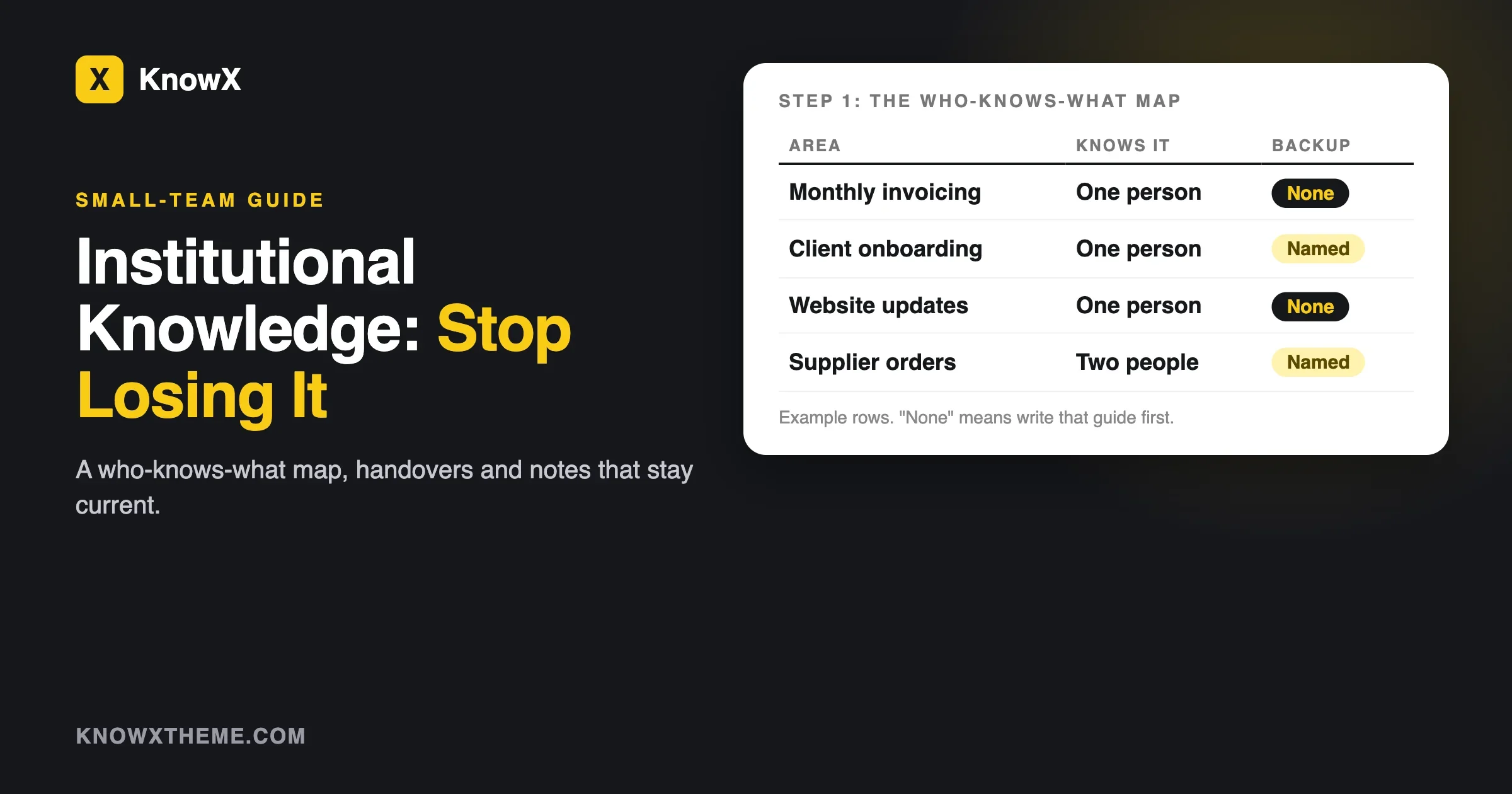
Area | Who knows it | Backup | Written guide | Last checked |
|---|---|---|---|---|
Monthly invoicing | Dana | None | No | |
Client onboarding | Sam | Dana | Yes, old | |
Website updates | Priya | None | No |
The table above shows made-up names and tasks. The rows with “None” in the backup column are your risks. Write those guides first.
Step 2: Write down the answers people ask for most
The fastest way to capture knowledge is to follow the questions. Look at the last month of chat and email and list the questions that were answered by one particular person. Each one is a candidate article.
Write each article with the template in our guide on writing a knowledge base article people finish. Keep to one task per article. Put the steps in order. Add the reason for any odd step, because the reason is what the next person needs when the situation changes.
Group the articles under a few clear topics. Our guide on how to structure knowledge base categories gives four rules for this.
Step 3: Record decisions and the reasons behind them
Documents tell you what to do. Decisions tell you why, and the “why” is the first thing to disappear. A decision log is a short list of choices with the reasons. Keep each entry to five lines.
Field | What to write |
|---|---|
Date | When it was decided |
Decision | What you chose, in one sentence |
Why | The main reasons |
Other options | What you looked at and rejected |
Who | Who decided and who to ask |
Wikipedia’s article notes that much of what goes unrecorded is to do with decision-making. A log of ten short entries a year closes much of that gap for a small team.
Step 4: Pair people on tasks only one person knows
Writing captures explicit knowledge. For tacit knowledge, people need to work together. The Wikipedia article on knowledge management describes Nonaka’s SECI model, in which socialisation (sharing know-how through working side by side) and externalisation (putting it into words) feed each other. For a small team, that comes down to two habits:
- Shadowing. The second person watches the expert do the task once.
- Reverse shadowing. The second person does the task while the expert watches, and writes up the steps as they go.
The write-up from reverse shadowing is usually the best article, because it is written by someone who just learned the task and still remembers what was confusing.
Step 5: Run a handover when someone leaves
Wikipedia’s article mentions oral debriefing of exiting employees as a way to capture what they know. Here is a plain version a small team can run. It works for a resignation, a retirement or a long leave.
As soon as you know
- Ask the person to list the tasks only they do. Compare the list with your map from step 1.
- Agree on the top five. These are the handover priorities.
- Pick who takes each task over.
In the notice period
- For each priority task, have the person do it once while the successor watches, then once with the successor doing it.
- Ask the successor to write the steps as a how-to article.
- Ask the leaver to read the article and correct it.
- Record a short walk-through video or screen recording if the task is hard to describe in words.
In the last week
- Ask: what do you wish someone had told you in your first month? Write down the answers.
- Ask: what is likely to go wrong in the next three months, and what should we do? Add the answers to the relevant article.
- Ask: who outside the team should we introduce ourselves to? Write the names and contact notes.
- Check that shared access is moved to a password manager or another owner.
Be kind about it. A handover feels easier when it is framed as “make your work easy to pick up”, not “empty your head before you go”.
Questions to ask in a handover conversation
A good conversation brings out the knowledge people forget they have. Use a short list and write the answers straight into the knowledge base. Our own list for a handover:
- What do you do every week that nobody else sees?
- What do you do only once a year, and when is it due?
- Which tasks fail most often, and what is the first thing you check?
- Which customers, suppliers or colleagues need special handling, and why?
- What did we try and stop, and what did we learn?
- Which shortcuts, templates or tools do you rely on?
- Where do you keep the files, and where are the copies?
- Who outside the team do you rely on, and how do you reach them?
- What would you check in the first week if you took over this job?
- What is unfinished, and what is the next step on each item?
People tend to answer better when they can talk, so consider recording the conversation, with their permission, and writing the notes afterwards. A short list of questions is better than a long form, which people skip.
A quick way to capture a task: the 30-minute walk-through
Some tasks are too fiddly to write down cold. For those, try a thirty-minute walk-through with a screen recording and a second person.
- Pick one task. Choose one you have marked as a risk on your map.
- Do it live. The expert does the task while the second person watches and asks “why” at each odd step.
- Record it. A screen recording with a voice-over is enough.
- Write it up. The second person turns the recording into a how-to article, with the reasons added.
- Check it. The expert reads the article and corrects what is wrong.
- File it. Put the article under the right topic with an owner and a review date.
Keep the recording as a backup for the written steps, not a replacement. People can search text and scan it quickly, and they cannot do that with a video.
What managers can do
- Make time for it. Writing and pairing take hours. If nobody plans for them, they will not happen.
- Treat guides as part of the job. A task is not finished until the next person could do it from the notes.
- Do not punish gaps. If people fear blame for saying “only I know this”, they will not say it.
- Rotate tasks now and then. Swapping a task for a week shows quickly whether the guide works.
- Review the map every quarter. People change roles, and the risk list changes with them.
None of these costs money. They take attention, and they pay back the first time someone is away and the work carries on.
Step 6: Keep the notes current
Notes that nobody reviews go wrong, and wrong notes are worse than none. Put owners and review dates on articles, and set a monthly check. Our guide on keeping a knowledge base current gives a review routine for stale articles, including how to retire articles without breaking links.
KnowX shows a “Last updated” date on each article, according to its WordPress.org page. That date lets a reader judge how far to trust a page. If the page is old and the topic changes often, they know to check.
Where should you keep it?
Keep written knowledge where people already look, and where it is easy to edit. For a small team, a knowledge base is a good home. It can be private to staff. If you use WordPress with KnowX, note that the theme has no access settings. A staff-only site needs a plugin or a server rule that requires login. We explain the options in internal wiki vs knowledge base and on our internal knowledge base page.
A shared drive can work as a first step. The risk is that files pile up with no structure, search that only matches file names, and no clear owner. If you start there, move the most-used documents to a knowledge base when search becomes the problem.
What goes wrong, and how do you fix it?
Only the leaver knows what is missing
Symptom: after someone leaves, small tasks fail and nobody knows why.
Check: list what broke and who used to do it.
Fix: ask the person to answer a short list of questions by email, if they are willing. Write down what you learn and add it to the map.
Prevent: run the handover steps above for every departure, including part-time and contract roles.
The guides exist but nobody uses them
Symptom: people still ask in chat.
Check: search for a real question. Does the guide appear? Is the title in the words people use?
Fix: rename the article, add the words people use, and link it in the reply.
Prevent: make “link the article” the habit for every answer.
One person writes everything
Symptom: the same author on every article, and the same person is the bottleneck.
Check: count authors on the last twenty articles.
Fix: make each topic owner write their own area. Give a template.
Prevent: include “write it down” in your definition of done.
Guides are wrong
Symptom: someone follows a guide and it fails.
Check: when was it last updated, and who owns it?
Fix: correct it now, and put a date on it.
Prevent: a monthly review of the most-used articles.
Signs your team is at risk right now
- A task has only one person who can do it, and no written steps.
- Someone is the only contact for a client, supplier or system.
- New starters keep asking the same questions, and the answers are in people’s heads.
- When one person is on holiday, a task waits until they are back.
- The team repeats a mistake it made a year ago, because nobody recorded the lesson.
- Shared accounts live in one person’s notebook or phone.
If three or more of these are true, start with the map in step one this week. It takes an afternoon, and it tells you exactly where to put your time.
Who should own this in a small team?
One named person should own the routine, even if everyone writes. In a team of five, that might be the office manager or the team lead. Their job is small: keep the map up to date, run the monthly review and start the handover checklist when someone gives notice.
A 90-day plan for a small team
Days | What to do |
|---|---|
1 to 14 | Build the who-knows-what map. Mark the single-person risks. |
15 to 45 | Write one article for each of the top five risks. Start a decision log. |
46 to 60 | Pair people on the next five tasks. Write up the steps after each pairing. |
61 to 75 | Put owners and review dates on every article. Test search with real questions. |
76 to 90 | Run your first monthly review. Write the handover checklist for departures and keep it where managers can find it. |
After the ninety days, keep a light rhythm: one article a week, one review a month, one handover whenever someone leaves.
Questions about institutional knowledge
What does institutional knowledge mean?
The know-how, history and context an organisation holds, including what is not written down. It is also called institutional memory, organisational memory or tribal knowledge.
What is an example of institutional knowledge?
Knowing why a supplier was chosen, how a recurring report is really produced, or which client needs a phone call and not an email.
How do you capture institutional knowledge?
Map who knows what, write the answers people ask for most, record decisions and their reasons, pair people on single-person tasks, run handovers and review notes on a schedule.
What is the difference between institutional knowledge and a knowledge base?
Institutional knowledge is what the organisation knows. A knowledge base is one place to keep the written part of it. See what a knowledge base is.
What happens when employees leave?
The knowledge in their heads goes with them unless it was shared or written down. The BLS figures above show that people move on regularly, so plan for it.
Can software capture tacit knowledge?
Software can store what people write and record. The Wikipedia article on tacit knowledge describes it as hard to put into words, so the main work is people working together and explaining the reasons behind what they do.
What we could not confirm
Definitions are from Wikipedia articles on organisational memory, knowledge management and tacit knowledge, because dictionary sites blocked our tools. The BLS figures are national medians for all wage and salary workers, and they do not describe any one industry or company. We found no source for the cost of losing knowledge in a small business, so we give no cost figure. The six kinds of knowledge, the decision log fields, the handover steps and the 90-day plan are our own methods, based on common practice, and we have not tested them with a team. KnowX facts come from its WordPress.org page, read on 11 November 2026.
What to do next
Make the map this week. List ten tasks, who knows each one and who could cover it. The rows with no backup are your first articles. When you are ready for a place to keep them, see our internal knowledge base page and the free KnowX theme.
Figures checked against the sources named above on 11 November 2026.