Internal Wiki vs Knowledge Base: Which Does a Small Team Need?
An internal wiki is a shared workshop. A knowledge base is the team manual. Learn which a small team needs first and how to start with three topics.

A wiki is a shared notebook that anyone on the team can edit. A knowledge base is a curated set of answers that a few people own and keep correct. A small team usually needs the knowledge base first, because the pain it feels is “where is the right answer?”, not “where can I write things down?”. This guide explains the difference in plain terms, shows when each fits, and gives you a way to start an internal knowledge base with three topics this week.
What is the difference between an internal wiki and a knowledge base?
The difference is who writes, and how much you can trust what you read.
Internal wiki | Internal knowledge base | |
|---|---|---|
Who writes | Everyone | A few owners, with input from everyone |
What goes in | Anything: notes, plans, drafts, meeting records | Finished answers to repeated questions |
Structure | Grows as people add pages | Planned topics, one home per article |
How you use it | Browse, link, edit | Search, read, act |
Trust | Check the date and the author | Assume it is current |
Typical failure | Sprawl: five pages on one subject, none complete | Staleness: correct last year, wrong today |
Think of a wiki as the team’s workshop and a knowledge base as the team’s manual. In the workshop, things are half-built and everyone is welcome to pick up a tool. The manual is what you hand to a new starter on day one and expect them to follow.
Both are useful. Trouble starts when one tool is asked to do both jobs. A wiki used as a manual leaves new staff guessing which of four pages is right. A knowledge base used as a workshop fills up with drafts until nobody trusts it.
What problem are you really trying to solve?
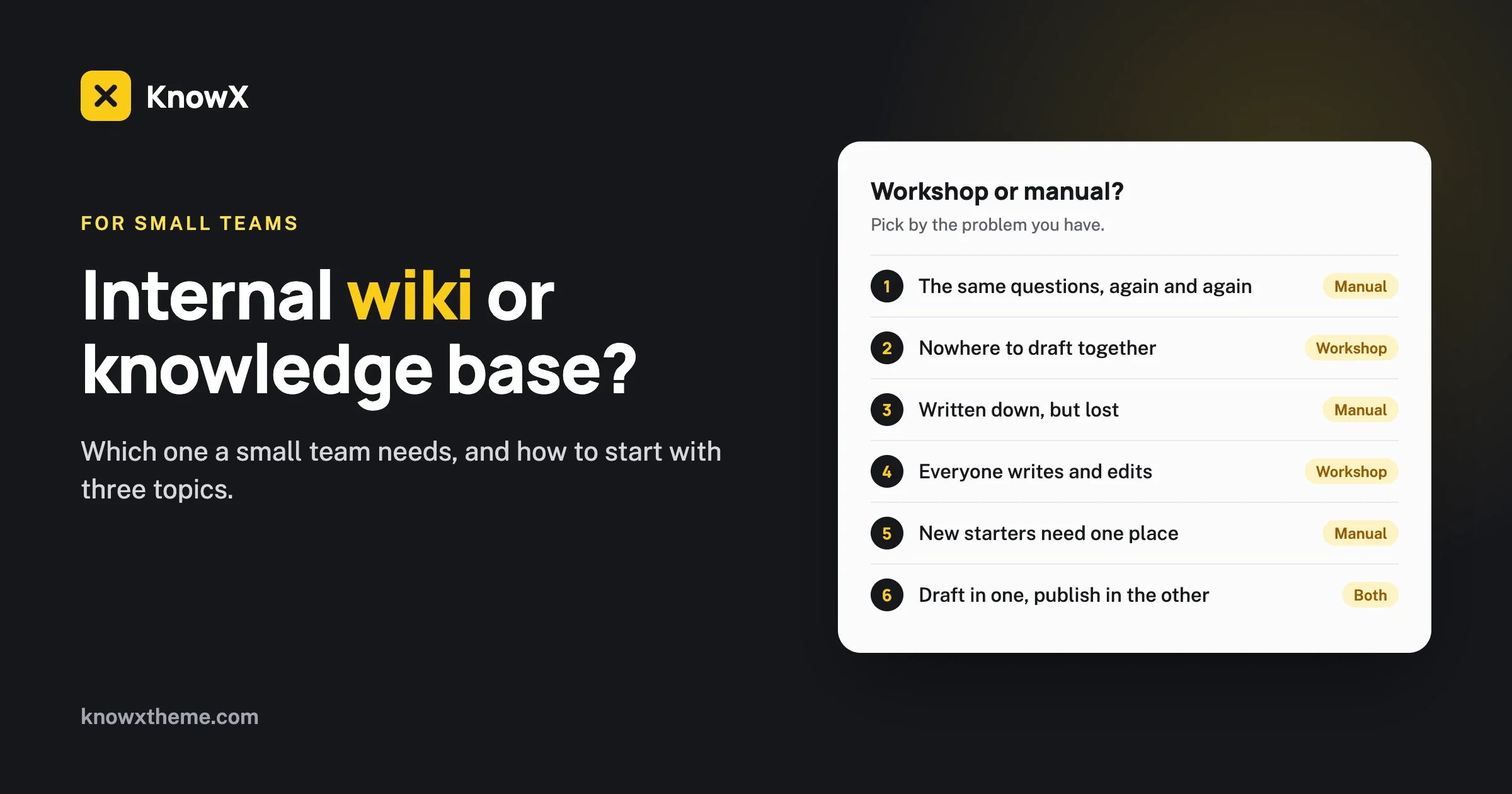
Before you choose, name the pain. Small teams reach for “we need a wiki” when the real problem is one of three quite different things.
“People keep asking me the same questions”
This is a knowledge base problem. The answers exist in someone’s head. They need to be written once, clearly, and put where everyone looks first.
“We have nowhere to work things out together”
This is a wiki problem, or a shared documents problem. You need a space for drafts, plans and notes where editing is easy and nothing has to be finished.
“We wrote it down but nobody can find it”
This is a structure problem, and a new tool will not fix it. You have the content. It needs fewer places, clearer names and one obvious front door. That is what a knowledge base gives you, and you may be able to build one from what you already have.
In our experience the first and third are far more common in teams under thirty people. That is why we suggest starting with a knowledge base.
When does a small team need a knowledge base?
You need one when the same question is answered more than twice, or when the answer changes depending on who you ask.
Signs that you are there already:
- New starters take weeks to stop asking “how do I…”.
- One person is the only one who knows how a regular task is done, and things stall when they are away.
- The same question appears in your team chat every month.
- Two people do the same task in two different ways and both think theirs is the official one.
- Somebody has a personal document called “how things work here” that others keep asking for.
That last one is the best starting point you could have. A personal how-to document is a knowledge base waiting to be split into articles.
What goes in an internal knowledge base
- How-tos: request leave, claim expenses, set up a laptop, publish to the website.
- Policies in plain words: working hours, holidays, what to do when you are ill.
- Reference: who owns what, which tool is used for which job, where the logo files are.
- Troubleshooting: the printer, the VPN, the shared calendar.
What stays out
- Meeting notes and project plans. They belong in the workshop.
- Drafts. An article goes in when it is right.
- Passwords and secrets. Use a password manager.
- Anything only one person will ever need.
When does a small team need a wiki?
You need a wiki when the team’s main work is thinking together in writing: engineering teams documenting systems as they build them, research groups, agencies with many live projects.
A wiki works when three things are true:
- Most people write. If only two people ever add pages, you have a knowledge base with weaker structure.
- Someone gardens. A person merges duplicates, archives dead pages and fixes the home page. Without a gardener, every wiki sprawls.
- Readers accept uncertainty. People know to check the date and ask the author if it matters.
If those are not true for your team, a wiki will give you the freedom to write and none of the confidence to rely on what is written.
Can you use both?
Yes, and many teams settle there. The rule that keeps them apart is simple: work in the wiki, publish to the knowledge base.
A new process is argued over and drafted in the wiki or in shared documents. When it is agreed, someone writes the clean version as a knowledge base article, and the draft is archived or linked from the article as background. Staff then know that the knowledge base is the manual and everything else is working paper.
For a team of ten, “the wiki” can be nothing more than your existing shared documents folder. You do not need to buy two tools.
How do you start an internal knowledge base with three topics?
Start small enough to finish in a week. Three topics, five articles each.
Step 1: Collect the questions
For one week, ask everyone to forward any question they answered more than once. Scroll back through a month of team chat as well. You will have thirty questions by Friday.
Step 2: Sort them into three topics
Group the questions and name each group in the words people used. For most small teams the first three are close to these:
- Getting Started: what a new person needs in their first two weeks.
- How We Work: leave, expenses, hours, tools.
- Fix It: the IT and admin problems that come up again and again.
Step 3: Write five articles per topic
Pick the five most-asked questions in each topic. Write each as a short article: the answer in the first two lines, then numbered steps, then who to ask if it does not work. Fifteen short articles is a day or two of writing shared between two or three people. Our article template gives you the structure.
Step 4: Give every article an owner
Put a name or a team at the bottom of each article. The owner is the person who updates it when things change, and the person readers tell when it is wrong. Without owners, an internal knowledge base goes stale within a year.
Step 5: Make it the first place to look
When someone asks a question in chat that the knowledge base answers, reply with the link. Do it kindly and every time. Within a month people check there first. If a question has no article, that is your next article.
What should an internal knowledge base look like?
For staff, browsing matters more than it does for customers. A new team member often does not know what to search for, because they do not know what exists. A single page that lists every topic with its articles lets them see the whole map.
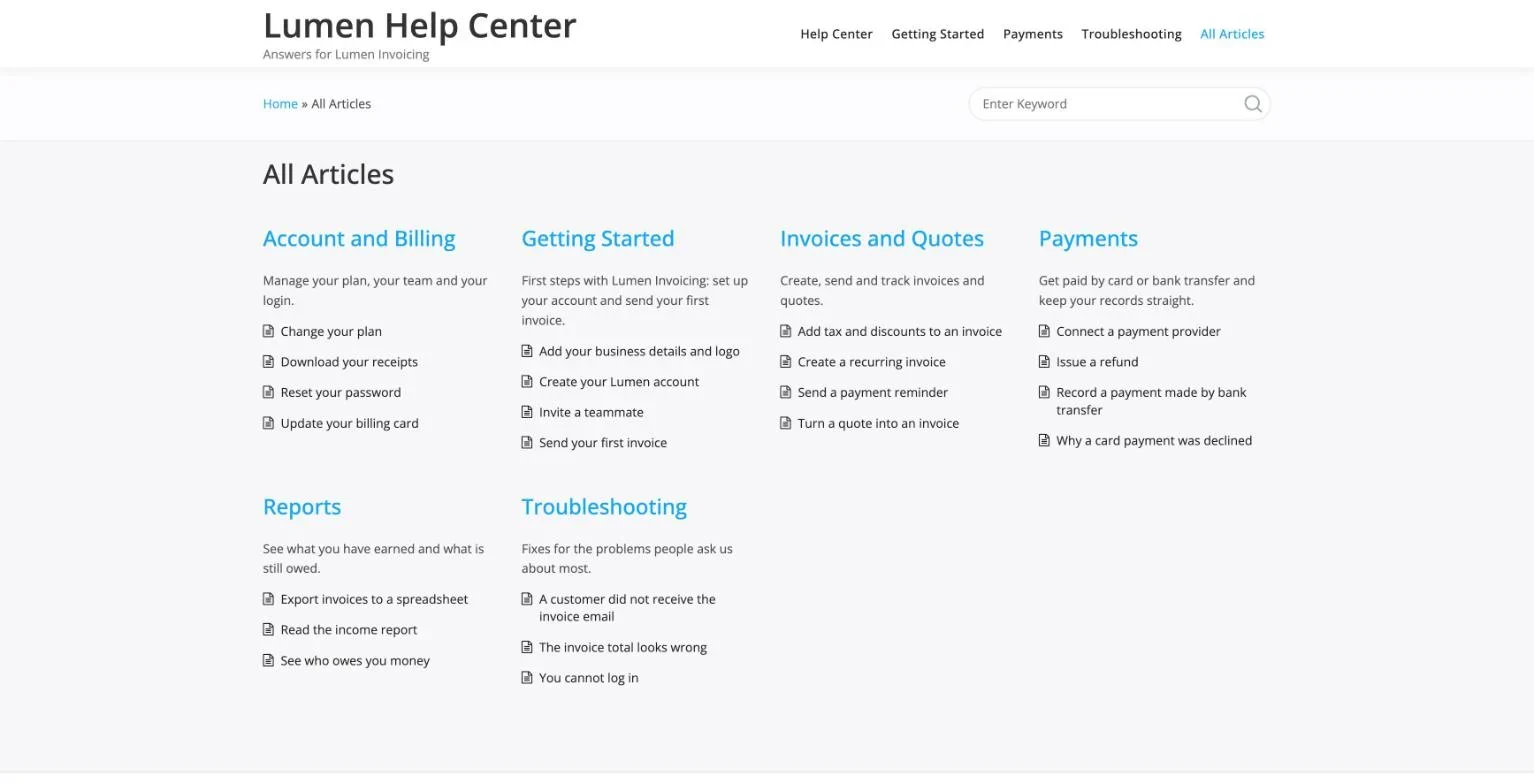
This is Layout Two in KnowX, our free knowledge base theme for WordPress. The screenshot shows a customer help center, and the same layout works for a staff handbook: swap the topics for Getting Started, How We Work and Fix It. Topics are WordPress categories and articles are normal posts, so anyone who can write an email can add one. WordPress keeps a revision history for every post, so you can see what changed and restore an earlier version.
How do you keep an internal knowledge base private?
You put the whole site behind a login. Be clear about this before you start, because the right approach depends on your tool.
With KnowX, the honest position is this. The theme does not restrict access. It has no per-article or per-role access settings. For a staff-only site on WordPress you need one of these:
- A plugin that requires login for every page, so visitors who are not signed in see only the login screen.
- A server rule, such as password protection set at your host, or limiting access to your office network or VPN.
- Custom work for single sign-on with your company accounts, or for sections that only some teams can see.
The first two are simple and suit most small teams. The third is the kind of project we take on as custom development.
One more point. Even behind a login, an internal knowledge base is not the place for passwords, bank details or personal records. Link to where those are kept safely.
What does a good internal article look like?
It is short, it starts with the answer, and it ends with a name. Here is a complete example. Notice that it would take two minutes to write and that a new starter could follow it without asking anyone.
Claim an expense
Submit expenses in the finance tool by the 25th and they are paid with that month’s salary. You need a photo of the receipt.
Before you start: you need your login for the finance tool. If you do not have one, ask the office manager.
Steps
1. Open the finance tool and choose New expense.
2. Enter the amount and pick a category.
3. Attach the photo of the receipt.
4. Select Submit. Your manager is emailed to approve it.
If it did not work: expenses over the monthly limit need approval first. Ask your manager before you spend.
Owner: Finance team. Last checked this quarter.
Compare that with how the same knowledge usually lives in a wiki: a page called “Finance” with four years of edits, a paragraph about the old expenses system, and the current deadline mentioned somewhere near the bottom. Both contain the answer. Only one of them gives it to you.
How does a knowledge base help a new starter?
It turns the first two weeks from a series of interruptions into a reading list. This is the quickest way to feel the value, so it is worth setting up on purpose.
Create one article called “Your first week” in the Getting Started topic. It is a list of links to other articles, in the order a new person needs them:
- Set up your laptop and accounts
- Who is who, and who owns what
- How we use chat, email and meetings
- Working hours, leave and what to do when you are ill
- Claim an expense
- Where to find files, logos and templates
- Who to ask when you are stuck
Send that one link before the person’s first day. Then ask every new starter to do one thing in return: each time they have to ask a question the knowledge base did not answer, they write it down. At the end of their second week you have a list of the gaps, written by the only person on the team who can still see them. Turn that list into articles and the next new starter will have an easier time.
How do you know it is working?
You do not need analytics to tell. Watch for four plain signs over the first two months.
- Repeat questions fall. Count how-to questions in team chat for a week before you start and a week two months later.
- People link to it. When colleagues answer each other with a knowledge base link without being asked, it has become the manual.
- People report mistakes. This is a good sign. Nobody reports errors in something they do not read.
- New starters settle faster. Ask them at the end of week two how many questions they had to ask in person.
If none of those move, the cause is almost always one of two things: the answers people need are not in there yet, or the titles do not match the words people use. Both are fixed by rereading the questions people ask and writing to those.
What rules should you write on the home page?
A few lines at the top of an internal knowledge base save a lot of confusion. They tell everyone what it is for and how to help keep it right. You can copy these:
- This is our manual. Everything here is current. If something is wrong, tell the owner named on the page.
- Finished answers only. Drafts, plans and notes live in shared documents.
- If you explain something twice, write the article.
- One article, one question. Short is good.
- No passwords or personal details. Link to where they are kept.
What goes wrong, and how do you fix it?
Nobody uses it
What you see: the same questions still arrive in chat.
Check: search the knowledge base for the last five questions asked. Are the answers there, under words people would use?
Fix: add the missing ones, retitle the hidden ones, and answer the next question with a link.
Prevent: make “is it in the knowledge base?” the first reply to every how-to question.
It is out of date
What you see: someone follows an article and it is wrong.
Check: does the article have an owner, and do they know?
Fix: correct it the same day and thank the person who reported it.
Prevent: owners on every article, and a quarterly half-hour where each owner rereads theirs.
It turns into a dumping ground
What you see: meeting notes, drafts and old plans mixed in with the how-tos.
Check: for each article, ask whether a new starter would need it.
Fix: move working papers to shared documents and delete what is dead.
Prevent: one rule, written on the home page: finished answers only.
Only one person writes
What you see: the knowledge base stops growing when that person is busy.
Check: count the authors of the last ten articles.
Fix: ask each team lead for the three questions they answer most, and for an hour to write them up.
Prevent: when anyone explains something twice, they write the article.
Too many topics too soon
What you see: twelve topics, most with one article.
Check: count the articles per topic.
Fix: merge down to the three or four that have real content.
Prevent: add a topic only when you have at least three articles for it. See our guide to structuring categories.
How do you move from a messy wiki to a knowledge base?
If you already have a wiki or a folder that has sprawled, do not try to tidy all of it. Lift out what matters and leave the rest.
- Find the pages people really use. If your tool shows page views, take the top thirty. If not, ask five colleagues which pages they have opened this month.
- Rewrite each as a clean article. Answer first, steps, owner. Do not copy and paste. Old pages carry old mistakes.
- Publish them in the knowledge base under three or four topics.
- Put a note at the top of each old page pointing to the new article.
- Leave the rest alone. Archive the wiki as read-only working history. Nobody will miss most of it.
This takes a small team about two weeks of part-time effort, and it replaces years of sprawl with thirty answers people trust.
Questions about wikis and knowledge bases
Is a knowledge base just a wiki with rules?
Close. The rules are the point: fewer writers, planned topics, finished articles and named owners. Those four rules are what let a reader trust the page in front of them.
Is WordPress good for an internal knowledge base?
It suits teams that want simple, topic-grouped articles and are comfortable with WordPress. It is not a real-time collaborative editor, so it is a poor workshop and a good manual. Read more on our internal knowledge base page.
How many articles should we start with?
Fifteen. Three topics of five. It is enough to be useful and small enough to finish.
Who should own the knowledge base?
One named person for the whole thing, who keeps the structure tidy, and one owner per article for the content. In a small team the first role is an hour a month.
Do we need different sections for different teams?
Not at first. Most early content is useful to everyone. If you later need sections only some teams can see, that needs an access plugin or custom work on WordPress, because KnowX does not restrict access by itself.
Should customers and staff share one knowledge base?
Usually not. Customers and staff ask different questions and need different levels of detail, and staff articles often mention things customers should not see. Run two: a public help center and a private internal one. On WordPress these can be two sites, or two knowledge base pages on one site with the internal one behind a login.
How long should an internal article be?
As short as it can be and still let a new starter finish the task without asking anyone. For most how-tos that is under two hundred words. If an article needs more, it is probably two articles.
What if people prefer to just ask?
Some always will, and that is fine. Answer them with the link and one friendly line. The goal is not to stop people talking to each other. It is to stop the same answer being typed out for the tenth time.
What does it cost?
With WordPress and KnowX the software is free and you pay for hosting. There is no per-seat fee, which matters for an internal tool that every member of staff reads. We compare the costs of different options in what free knowledge base software really costs.
What should you do next?
This week, collect the questions your team asks more than once. Sort them into three topics and write the five most-asked in each. That is an internal knowledge base, and it will save more time in its first month than it took to write.
If you want to see how it could look, open the live KnowX demo and choose All Articles in the menu.