Knowledge Base or Community Forum for Support: Which First?
Start with a knowledge base, add a forum when questions stop repeating. How to tell which your support needs first, and how the two feed each other.

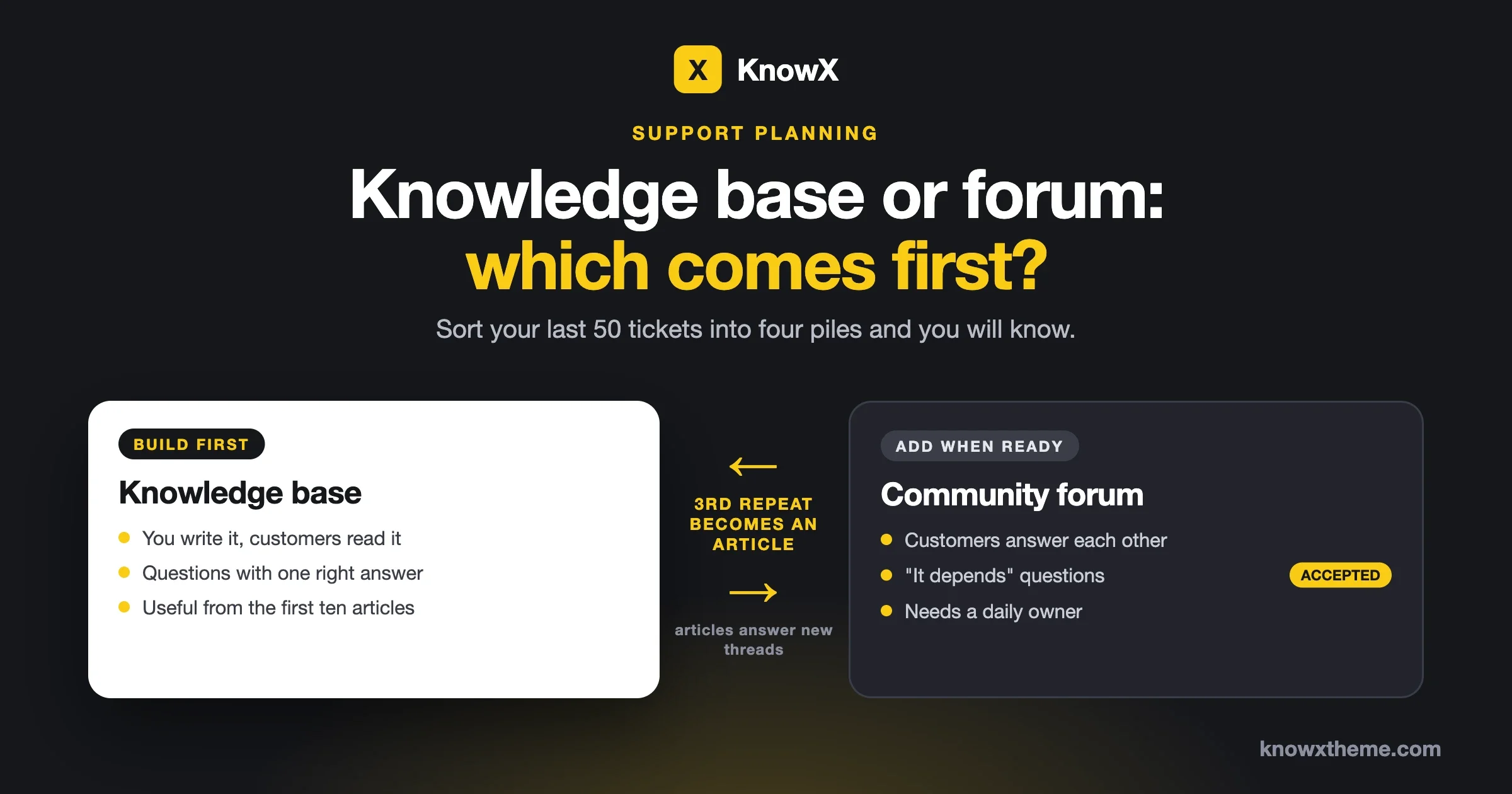
Start with a knowledge base. Add a community forum when you have customers who answer each other and questions that no article can settle in advance. A knowledge base works from the day you publish the first ten articles, with no audience needed. A forum needs people in it before it is useful, and an empty forum makes a product look abandoned. There are three situations where the forum should come first, and this guide covers them, along with a test you can run on your own support inbox in half an hour.
We make KnowX, a free knowledge base theme for WordPress, so we lean towards the knowledge base side and you should weigh our advice with that in mind. We have tried to make the test below fair enough that it can tell you to start with a forum.
What is the difference between a knowledge base and a community forum?
A knowledge base is written by you and read by customers. A forum is written by customers, for each other, with your team taking part. Both are places where people find answers without opening a ticket. They differ in who does the writing and who is responsible for being right.
Knowledge base | Community forum | |
|---|---|---|
Who writes | Your team | Customers, with your team joining in |
Best for | Questions with one correct answer | Questions that depend on the customer’s own setup or goals |
Useful from | The first ten articles | The point where questions get a reply within a day |
Who is responsible for accuracy | You, fully | Shared. Wrong answers can sit there until someone corrects them. |
Ongoing work | Updating articles when the product changes | Reading, replying and moderating every working day |
What it looks like when neglected | Out of date | Empty, or full of unanswered posts |
The last row is the one that should guide the order. A knowledge base that has fallen behind still helps with everything that did not change. A forum that has fallen behind tells every visitor that nobody is there.
Which should you build first?
The knowledge base, in most cases. Three reasons.
It does not depend on anyone else. You can write twenty articles this month and they will answer real questions next month. A forum depends on customers choosing to show up, ask in public, and come back to answer others. You can encourage that. You cannot schedule it.
Repeat questions come first. A young product gets the same questions again and again: how to install, how to log in, how billing works, how to cancel. Those have one right answer. An article is the correct tool for a question with one right answer, and a forum thread is a poor one, because the right reply ends up on page two under three guesses.
A forum needs somewhere to send people. The fastest good reply in any forum is “here is the article that covers it”. Without a knowledge base, every forum reply has to be written out in full, by you, every time.
When should the forum come first?
In three situations.
- Your customers already help each other somewhere else. If there is an active Facebook group, a Discord server or a subreddit where users answer questions about your product, the community exists. You are choosing where it lives, and your own site is a better home than a platform you do not control.
- Most questions have no single answer. Products that people build things with, such as design tools, developer tools, courses and hobby products, get questions like “how would you approach this?” No article can answer that in advance. Peers can.
- Your users know more than your support team does about using the product. This is common with technical tools and with products that serve a specialist trade. The experts are your customers, and a forum lets them be useful.
If none of these describes you, a forum opened today will most likely be you answering in public the same questions you now answer by email. That is more work, not less.
How do you tell which your support needs? The 50-ticket test
Open your support inbox, take the last 50 conversations, and put each one into one of four piles. It takes about thirty minutes and gives you a decision based on your own customers.
Pile | How to recognise it | Where it belongs |
|---|---|---|
Repeat question | You have answered it before, with the same answer | Knowledge base article |
It depends | The answer changed with the customer’s setup, goal or taste | Forum or Q&A |
Idea or request | “It would be great if” or “can you add” | Ideas board |
Private | Billing, account access, a bug in one account, a complaint | Ticket or email, always |
Then read the piles.
- Repeat questions are the biggest pile. Build the knowledge base. Write one article for each question that appears more than twice.
- “It depends” is the biggest pile. A forum or Q&A space will earn its keep. Still write the ten basics first so the forum has something to link to.
- Ideas are a large pile. You need a public place for requests more than you need a discussion forum. More on that below.
- Private is the biggest pile. Neither will reduce your inbox much. The better investment is fixing whatever in the product or the billing flow causes those conversations.
The split we describe here is our own working rule from running support for WordPress products. It is not a published benchmark, and your piles are the evidence that counts.
What does each one cost to run?
The software can be free for both. The cost is time, and the two spend it differently.
A knowledge base costs time in bursts. A larger effort at the start to write the first set of articles, then a smaller, regular job: update articles when the product changes, and add one whenever a new question shows up three times. If nobody touches it for a month, nothing visibly breaks.
A forum costs time every day. Someone has to read new posts, reply or tag a colleague, remove spam, move threads to the right place, and correct wrong answers politely. If nobody looks for a week, customers see unanswered questions with dates on them. Plan for a named person and a daily slot before you open one.
A forum also has costs a knowledge base does not:
- Spam and sign-up abuse. Any place where the public can post needs moderation settings and someone watching.
- Wrong answers. A confident customer can post advice that breaks another customer’s setup. You need a way to mark the correct reply.
- Public complaints. An unhappy customer posts where everyone can read it. Handled well, that builds trust. Left alone, it does the opposite.
- Personal data. People paste order numbers, emails and screenshots with private details into public threads. Someone has to edit those out.
For what “free” covers on the knowledge base side, see what free knowledge base software really costs.
How do a knowledge base and a forum feed each other?
They work as a loop. The forum shows you what to write, and the knowledge base keeps the forum from repeating itself.
- A customer asks in the forum. Someone answers. The asker or a moderator marks the reply that solved it.
- The same question appears a third time. That is the signal. Turn the solved thread into a knowledge base article, written cleanly, with the answer at the top.
- Link both ways. Post the article link in each of the old threads. In the article, add a line such as “Still stuck? Ask in the community” with a link to the right forum section.
- Future askers get the link. The reply becomes one line and a link, from staff or from another customer.
Two habits keep the loop working. First, write the article yourself. Do not paste the thread. A thread has greetings, wrong turns and replies to replies, and an article should have none of that. Our article template shows the shape. Second, keep the same topic names in both places. If the knowledge base has “Billing”, “Setup” and “Integrations”, give the forum the same sections, so nobody has to learn two maps. The rules in how to structure knowledge base categories apply to forum sections as well.
What goes wrong, and how do you fix it?
The forum is empty
Symptom. A handful of threads, most started by staff, the newest one months old.
Check. Count how many different customers posted in the last 30 days. If you can count them on one hand, the forum opened too early.
Fix. Either commit to seeding it, or take it out of the menu. Seeding means inviting your most engaged customers by name, moving suitable email questions there with the customer’s permission, and answering every post within a working day for three months. Half measures leave you with an empty room.
Prevent. Run the 50-ticket test before opening a forum, and open with one or two sections, not ten. Ten empty sections look far worse than two busy ones.
The forum is full of the same five questions
Symptom. New threads every week asking how to reset a password or where the invoice is.
Check. Search your knowledge base for each of those questions as a customer would type them. If you cannot find the article in one search, neither can they.
Fix. Write or retitle the article using the customer’s wording. Pin a short “Start here” post in the forum that links to the ten most-needed articles. Put the knowledge base search above the “new thread” button if your forum software allows it.
Prevent. Use the three-times rule: the third thread on a question becomes an article that week.
Staff answer everything and customers never do
Symptom. Every thread is one customer question and one staff reply.
Check. Look at how fast staff reply. If the team answers within minutes, customers never get the chance.
Fix. For “it depends” questions, wait a few hours before replying, then add to what customers have said. Thank people who answer well, by name. Reputation points and badges help some communities, though thanks from a real person does more.
Prevent. Decide at the start which questions staff answer immediately (anything about bugs, outages or money) and which are left open for the community first.
Old answers are now wrong
Symptom. A customer follows a two-year-old thread and it no longer matches the product.
Check. Look at which old threads still get visits. Those are the ones to deal with.
Fix. Add a staff reply at the end with the current answer and a link to the current article, and mark that reply as the accepted one. Close the thread to new replies.
Prevent. This is the main reason accuracy belongs in the knowledge base. An article gets updated. A thread gets buried.
Feature requests are scattered through support threads
Symptom. You know several people asked for an export button, and you cannot say how many or who.
Check. Search the forum and your inbox for one popular request and count the separate places it appears.
Fix. Give requests their own space where one request is one entry and customers add a vote. Merge duplicates into the oldest entry.
Prevent. When a request appears in a support thread, reply with a link to its entry and ask the customer to vote there.
A staged plan that works for a small team
You do not have to choose once and for all. Add each piece when the stage before it is steady.
Stage | Build | Move on when |
|---|---|---|
1 | A knowledge base with an article for every question you have answered more than twice | Most new tickets can be answered with a link to an article |
2 | One Q&A space for “it depends” questions, with accepted answers switched on | Customers answer each other in a fair share of threads |
3 | An ideas board for requests, with votes and a visible status | You use the vote counts when you plan work |
4 | More forum sections, only where there is demand | A section has gone a month without a post: merge it back |
Stage 1 on its own is a complete support setup for many small products. Plenty of teams stop there for a year or more, and that is fine.
How can I add a Q&A section with accepted answers to my product’s support site?
Install forum software that has a question-and-answer mode, create one space for questions, and turn on accepted answers so that the reply which solved the problem is marked and shown first. On a WordPress site this is a plugin, and it runs alongside your knowledge base on the same site with the same customer logins. One option is Jetonomy, a WordPress plugin from Wbcom Designs, the same team that makes KnowX: its site lists a Q&A space type where a question gets one marked best answer, replies can be voted on, and answers can be sorted by votes.
When you set it up, decide two things in advance. Who may mark an answer as accepted: the person who asked, your staff, or both. And what happens to questions with no accepted answer after a week, because someone on your team should own that list. We took the feature description from jetonomy.org on 12 October 2026, where the current version is shown as 2.0.1 with a free version and a paid Pro version. We have not tested it together with KnowX for this guide, so try the pair on a staging site first.
What tool lets customers vote on feature ideas inside our support forum?
You need an ideas board: a space where each request is one entry, customers add a vote, and your team sets a status. Some forum tools include one, so the requests sit beside the support questions under one login. Jetonomy’s site describes an ideas board where members upvote requests and you set status badges of Planned, In progress and Shipped. Standalone feedback tools do the same job as a separate product.
Whichever tool you use, three rules make an ideas board worth having. Reply to every new idea within a few days, even if the reply is “not planned, and here is why”. Update the status when it changes, because a board where nothing ever moves teaches customers to stop voting. And treat votes as one input: twenty votes from free users and two from your largest customers are not the same signal.
How does this look on a WordPress site?
The knowledge base and the forum can live on one WordPress site, which keeps one login for customers and one admin area for your team.
- The knowledge base is the main site. With KnowX, free on WordPress.org, articles are ordinary posts and topics are ordinary categories. The theme gives you a help center home page with search and topic tiles, and article pages with breadcrumbs.
- The forum is a plugin, at an address such as /community/. KnowX is a theme and does not include a forum, Q&A, voting or an ideas board of its own. It does detect bbPress and adds sidebar areas for it.
- The menu carries both: Help articles, Community, Contact support. Keep “Contact support” visible. Self-service works best when the way out is easy to find.
If you are still weighing where the knowledge base itself should live, theme or plugin covers that decision, and the customer help center page shows a finished example.
What should stay out of both?
Some support never belongs in public, however good your knowledge base and forum become.
- Anything about one person’s account or payment. Refunds, failed charges, login problems.
- Bugs that expose data or security problems. Give customers a private address to report these.
- Complaints that need a named person to respond.
- Outages. Post a status notice where everyone can see it, and handle individual cases privately.
Say this plainly at the top of the forum: “For billing or account questions, contact support here.” It saves you from editing private details out of public threads.
How do you know it is working?
Pick a small number of things you can count without special software, and look at them monthly.
What to count | Where | Good sign |
|---|---|---|
Tickets answered with only a link to an article | Support inbox | Going up, then those tickets going down |
Repeat-question tickets | Rerun the 50-ticket test each quarter | The pile shrinks |
Forum questions with an accepted answer | Forum | Most of them, within a few days |
Forum questions answered by a customer first | Forum | A growing share |
Ideas with a status other than “new” | Ideas board | Every idea older than two weeks |
One note on the knowledge base side. KnowX does not include article ratings or search reports. If you want a “was this helpful?” count or a list of searches that found nothing, add a plugin for it, or use the ticket counts above, which need nothing extra.
Questions about knowledge bases and forums
Can a forum replace a knowledge base?
Not well. A forum holds many versions of each answer, in the order they were posted, with nobody responsible for keeping them current. Customers with a simple question want one page that is right. Keep the forum for discussion and the knowledge base for the settled answer.
Can a knowledge base replace a forum?
For products with mostly repeat questions, yes, for a long time. It cannot cover “how would you do this?” questions or let customers help each other, so the need for a forum grows as your user base does.
How many customers do you need before a forum makes sense?
There is no reliable number. A product with a few hundred enthusiastic users can sustain a forum, and one with many thousands of occasional users may not. The 50-ticket test and the “do they already talk somewhere else” question are better guides than a headcount.
Should the forum be public or members only?
Public, if the goal is fewer tickets. A public thread can be found by the next customer through search. A members-only forum suits paid communities and anything where customers discuss private details of their work.
Is a Facebook group or Discord server enough?
It is a fast way to find out whether your customers will talk to each other. As a support archive it is weak: answers are hard to search, they do not appear in search engines, and the platform sets the rules. Use it as a test, and plan to move once the community is real.
We are a team of two. What is the least we should do?
Stage 1 only. Write the articles for your repeat questions, link them in every reply, and review them when the product changes. Come back to the forum question when the 50-ticket test shows a large “it depends” pile.
What should you do next?
Run the 50-ticket test this week. If repeat questions win, start the knowledge base: KnowX is free on WordPress.org, and this walkthrough takes you from install to a working help center. If “it depends” wins, write the ten basics first, then open one Q&A space and give it a named owner.
If you would like a second opinion on your own setup, send us a note with what you have today. Our team builds help centers and community sites on WordPress, and we are glad to point you in the right direction.