Best Free WordPress Knowledge Base Themes in 2026
The best free WordPress knowledge base themes: KnowX, iKnowledgeBase, Knowledge Base Lite, and Astra or Kadence with a free plugin. Versions, installs and fit, checked 3 November 2026.

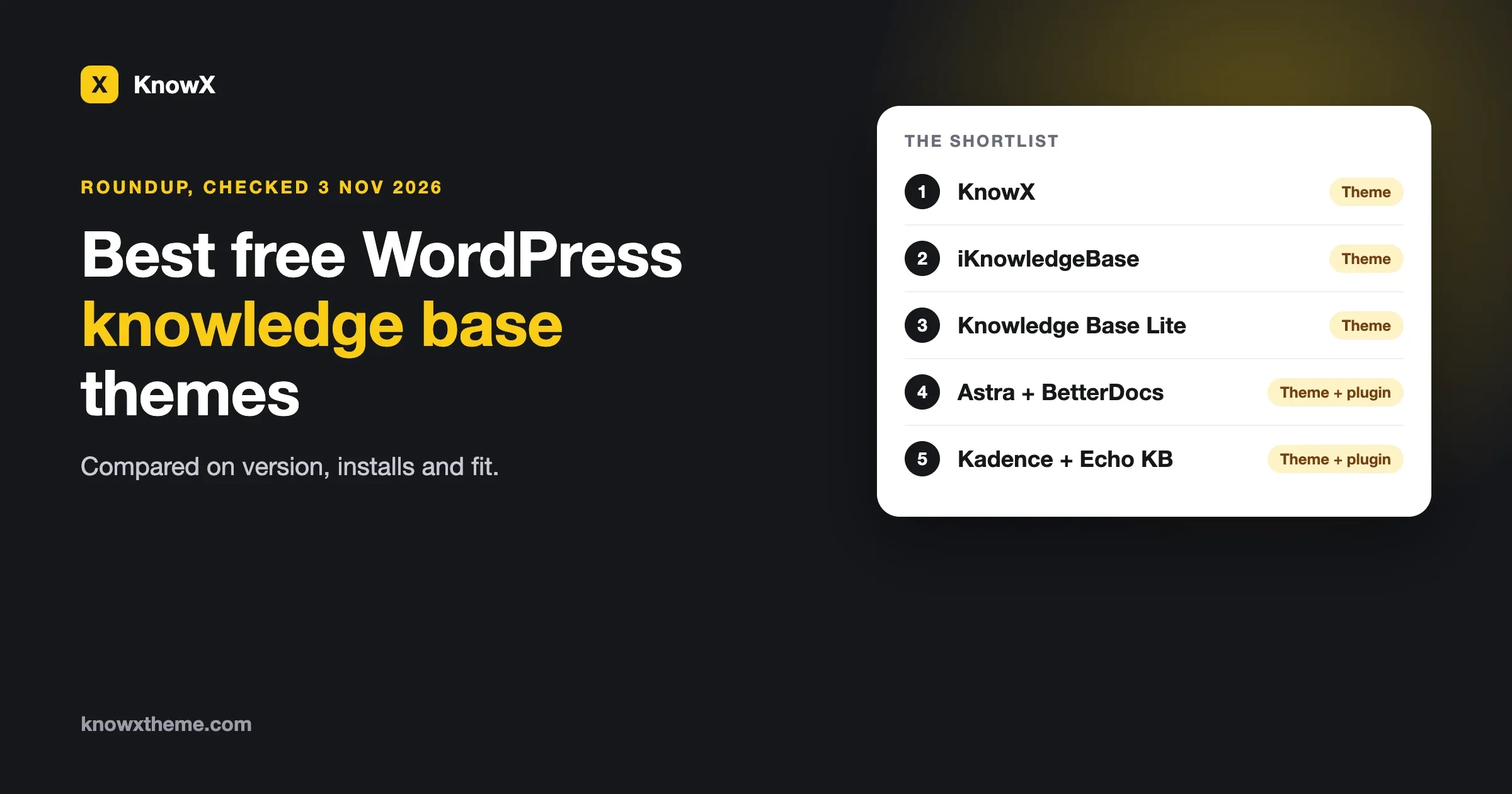
The best free WordPress knowledge base themes in 2026 are KnowX, iKnowledgeBase and Knowledge Base Lite, which are built for the job, and a general theme such as Astra or Kadence paired with a free plugin such as BetterDocs or Echo Knowledge Base. KnowX is best when the whole site is documentation and you want no plugins. iKnowledgeBase is a small, plain theme for a simple help center. Knowledge Base Lite suits an organisation that wants a landing page with a knowledge base section. Astra or Kadence with a plugin suits a site that already has a design and needs a knowledge base added to it.
Last checked on 3 November 2026. Every version, install count and rating below was read from each product’s WordPress.org listing on that day.
We make KnowX, so we are not neutral. We have tried to treat each option the way we would want ours treated: what it is, what the listing shows, where it fits and where it does not. We did not install and test every theme for this guide. The facts come from the WordPress.org directory, the product pages and, for KnowX, our own readme.
- Four free routes are worth a look: KnowX, iKnowledgeBase, Knowledge Base Lite, and a general theme plus a knowledge base plugin.
- Only KnowX, iKnowledgeBase and Knowledge Base Lite are themes made for knowledge bases. Astra and Kadence are general-purpose, so the knowledge base features come from the plugin you add.
- BetterDocs and Echo Knowledge Base are free plugins on WordPress.org, and both mark some features as Pro on their listings.
- The themes differ most in how young and how widely used they are. KnowX shows 100+ active installs and Knowledge Base Lite 200+. Astra shows over a million.
- Free themes rarely include article voting, search analytics or ticketing. If you need those, plan on a plugin whichever theme you pick.
What is the best free WordPress knowledge base theme?
It depends on what the rest of your site looks like. There is no single winner, and anyone who names one without asking that question is guessing.
If your site is only a help center or documentation, choose a theme built for that, so the home page, article pages and search are designed for finding answers. If your site is a business site that needs a help section, choose the theme you already like and add a knowledge base plugin. The table below sums it up, and the sections after it give the detail.
Option | Type | Best for | WordPress.org |
|---|---|---|---|
KnowX | Knowledge base theme | A whole site that is documentation or a help center, with no plugins | Version 2.0.0, updated 19 October 2026, 100+ installs |
iKnowledgeBase | Knowledge base theme | A simple, plain help center with category control on the home page | Version 1.4.4, updated 23 April 2026, 900+ installs |
Knowledge Base Lite | Knowledge base theme | An organisation that wants a landing page and a knowledge base together | Version 0.9.8, updated 29 October 2026, 200+ installs |
Astra with BetterDocs | General theme and plugin | A site with a design you like that needs a docs section | Astra 4.14.2, over 1 million installs. BetterDocs 4.9.5, 30,000+ installs |
Kadence with Echo Knowledge Base | General theme and plugin | A block-editor site with a knowledge base section | Kadence 1.5.2, 500,000+ installs. Echo 17.311.1, 10,000+ installs |
KnowX: a documentation theme that needs no plugins
KnowX is our free theme for documentation sites, help centers and knowledge bases, released under GPL v3 or later. Version 2.0.0 came out on 19 October 2026 and needs WordPress 6.9 and PHP 8.1 or newer. Its WordPress.org listing shows 100+ active installs and one rating, so it is the youngest option in this list and has the smallest track record. We would rather you hear that from us.
What KnowX does
Per its readme, KnowX turns WordPress into a documentation site without a custom post type or a plugin. Products are top-level categories, sections are child categories and articles are ordinary posts. That means your content stays standard WordPress content, and it is still there if you switch themes later.
- Product cards on the docs home page, each with an icon, a short description and an accent colour.
- Article pages with a section tree, an “On this page” list, copy-link on headings, copy buttons on code blocks, previous and next links and a last updated date.
- Instant search, opened with Ctrl or Cmd plus K, that can search the current product or everything.
- FAQ and changelog page templates, 17 block patterns and an “applies to version” badge on articles.
- schema.org data for the site, articles, breadcrumbs and FAQ.
- Light and dark mode with a visitor toggle, plus your own colours.
- A one-time notice that can add sample docs, or an empty docs home, in one click. Activating the theme changes nothing by itself.
- Open Sans served from your own site, no jQuery and no external font requests.
What KnowX does not do
KnowX is a theme, so it does not include article voting or “was this helpful” feedback, search analytics, AI answers, ticketing or per-article access roles. If you need any of those, they come from a plugin, and you should read that plugin’s own page on the day you choose it. It is also a classic theme with block features, not a full site editing theme. Version 2.0.0 no longer needs the Kirki plugin, and it has fewer colour settings than 1.x, so people updating from 1.x should check the Customizer afterwards.
Best for: a site where the whole thing is documentation or a help center, you want a short list of moving parts, and you are comfortable with a young theme from a small team. You can get it from the KnowX page on WordPress.org, or read about the KnowX knowledge base theme on this site.
iKnowledgeBase: a plain theme for a simple help center
iKnowledgeBase is made by Wow-Company. Its listing describes it as an easy, fast, minimalistic, responsive and mobile-friendly theme for creating a knowledge base, help desk, wiki or FAQ website. It lets you manage which categories show on the home page, includes breadcrumbs, and has a custom widget that shows the current navigation inside a category and on a single post.
On 3 November 2026 the listing showed version 1.4.4, last updated on 23 April 2026, with 900+ active installs and a minimum of PHP 7.4. The rating is about 3.6 out of 5 from five ratings, which is too few to tell you much either way. The theme has left and right sidebar options and a two-column layout.
Best for: a small help center where you want a plain layout with a sidebar and control over which categories appear on the home page. The last update was six months before our check date. That is not a problem by itself for a simple theme, but it is worth checking that it works on the WordPress version you run.
Knowledge Base Lite: a landing page and a knowledge base together
Knowledge Base Lite is made by VW Themes. The listing calls it an all-in-one support platform solution, with tools for knowledge bases, forums, help desks, wikis, FAQs and customer support centers. It is built on the Bootstrap framework and includes a call-to-action button, a banner and sections for a team, an about page and testimonials. The listing also mentions use cases such as schools, universities and online courses.
On 3 November 2026 it showed version 0.9.8, updated on 29 October 2026, with 200+ active installs and a minimum of WordPress 5.0 and PHP 7.2. The rating is 4.0 out of 5 from four ratings. The tags include block patterns, grid layout, custom colours and flexible header, and also e-commerce and portfolio, which tells you it is a broad theme.
One caution from the listing itself: the demo link in the description points to a Pro version of the theme. What you see on that demo may include features that are not in the free one, so install the free theme on a test site before you decide.
Best for: an organisation that wants a marketing-style home page, with a team and testimonials, and a knowledge base behind it. It is less focused on documentation than KnowX or iKnowledgeBase.
Astra or Kadence with a knowledge base plugin
The third route is to keep a general-purpose theme and let a plugin handle the knowledge base. This is what most people do when the help center is one part of a larger site.
The themes
- Astra is by Brainstorm Force. The listing on 3 November 2026 showed version 4.14.2, updated on 29 October 2026, with over 1 million active installs and a rating of about 4.9 out of 5 from 6,553 ratings.
- Kadence is by Nexcess. The listing showed version 1.5.2, updated on 24 July 2026, with 500,000+ active installs and a rating of about 4.9 out of 5 from 456 ratings. It needs WordPress 6.3 and PHP 7.4.
Both are used on all kinds of sites, and neither is a knowledge base theme. They give you the design, the header and the footer. The knowledge base itself comes from the plugin.
The plugins
- BetterDocs is on WordPress.org with 30,000+ active installs. The listing on 3 November 2026 showed version 4.9.5, updated on 12 October 2026, and a rating of about 4.8 out of 5 from 515 ratings. Its free features include ready-made templates for the docs landing page, single doc page and archive page, a table of contents and a live search bar. Several items on its listing are marked PRO, such as multiple knowledge bases, advanced search and popular docs layouts, and attachments on single docs.
- Echo Knowledge Base has 10,000+ active installs. The listing showed version 17.311.1, updated on 17 October 2026, and a rating of about 4.9 out of 5 from 124 ratings. Its free features include an AJAX search bar, breadcrumbs, next and previous navigation, and print and PDF export. Advanced search and granular content protection are listed as PRO. Its listing says the AI features are optional and disabled by default.
Best for: a business site that already has a design, or a team that wants features like multiple knowledge bases or content protection that a theme alone does not provide. The cost is two things to keep updated instead of one, and some of the best features sit in a paid tier. Check each plugin’s own page for current Pro prices, because we have not listed any.
Theme or plugin: how to choose
This is the real decision, and it comes before the product names. We wrote a longer guide, WordPress knowledge base: theme or plugin?, but the short version is this.
A knowledge base theme | A general theme plus a plugin | |
|---|---|---|
Design | The whole site is shaped for answers | Keeps the design you already have |
Moving parts | One | Two or more |
If you switch it off | Content stays as standard posts and categories (true of KnowX, which uses plain posts) | Plugin content may be hidden until the plugin is back |
Extra features such as voting or content protection | Usually need a plugin | Sometimes included in the plugin’s Pro tier |
Best when | The site is the help center | The help center is one section of a bigger site |
What should you check before you pick one?
A list of names is the easy part. These checks save you the awkward moment three months in.
- Check the last update date. On the WordPress.org listing, look at “Last updated”. A theme updated this month is being looked after. One updated six months ago may still be fine, so test it on your WordPress version.
- Check the minimum requirements. The minimum PHP version tells you how old the code is. It also tells you whether your hosting can run it.
- Look at the install count and ratings together. A low count is not a fault, it just means fewer people have found the problems. Treat a rating from four people as a hint, not a verdict.
- Install it on a test site. Import a few real articles and click through as a visitor, on a phone and a laptop.
- Search for a real question. Type a question your customers ask into the search box. If the answer does not appear, no theme will fix that. Our guide on knowledge base search not finding answers shows how word changes helped in a test.
- Check where your content lives. If you ever leave, will your articles still be ordinary posts?
What free themes usually leave out
Free knowledge base themes cover the layout and the reading experience. The features that need data or accounts usually sit elsewhere. Keep this list in mind when you compare.
- Article feedback. A “was this helpful” vote needs a place to store the answers and a way to show them to you.
- Search analytics. Seeing what people searched for and did not find means logging searches.
- Ticketing. A knowledge base answers questions. A ticket system tracks the ones it did not answer.
- Restricted articles. Showing an article only to certain people needs roles or a membership plugin. Echo Knowledge Base lists granular content protection as a Pro feature.
- Multiple knowledge bases. BetterDocs lists this as a PRO feature. KnowX handles several products through top-level categories, as described in its readme.
A sensible way to decide in an afternoon
- Write down your first fifty articles as a list of titles and the category each belongs to. If you cannot, you are not ready to choose a theme yet.
- Decide whether the knowledge base is the whole site or one section of it. That settles theme versus plugin.
- Pick two candidates from this list. No more.
- Install each on a test site and add five real articles to each.
- Ask someone who does not work with you to find an answer on both. Watch where they click.
- Keep the one where they found the answer faster, and check its update date once more.
If you plan to move an existing help center, our checklist moving a knowledge base off a hosted tool covers the export, images, links and redirects. If you are weighing WordPress against a hosted service, knowledge base software: self-hosted on WordPress or a SaaS help center compares the costs.
Common mistakes when choosing a knowledge base theme
Choosing by the demo. A demo shows the best case, with perfect articles and a tidy menu. Your site will have uneven articles. Test with your own content. For Knowledge Base Lite in particular, the demo in the listing shows the Pro version.
Buying features you can get later. Voting, analytics and restricted articles all come from plugins. You do not need them on day one, so do not let a long feature list pick the theme for you.
Starting with the theme before the structure. Categories decide whether people find answers, more than any theme does. Draw your categories first. Our guide on how to structure knowledge base categories gives four rules and a worked example.
Ignoring the update date. A knowledge base is a long-lived site. A theme that has not had an update for a year may stop working with a future WordPress release, and you will find out on a busy day.
Forgetting the articles themselves. A good theme with thin articles is still a poor help center. A reader who finds a page with three lines and no steps leaves and writes to your support team. Our knowledge base article template is a five-part structure you can copy.
Which one for which kind of site?
Your situation | Where we would start |
|---|---|
A software product with versions and several sub-products | KnowX, which has product cards, an “applies to version” badge and a changelog template |
A small FAQ or help center with a sidebar | iKnowledgeBase |
A school, club or organisation with a team page and testimonials | Knowledge Base Lite |
An existing business site with a design you like | Your current theme plus BetterDocs or Echo Knowledge Base |
A members-only or restricted help center | A general theme plus a plugin, because content protection is a plugin feature. Echo lists it as Pro |
A team that needs several separate knowledge bases | BetterDocs lists multiple knowledge bases as a PRO feature. KnowX handles several products with top-level categories |
None of these answers is permanent. Because your articles are standard WordPress content, you can change the theme later without rewriting them. That is the best reason to test two candidates on a staging site before committing.
Frequently asked questions
What is the best free WordPress knowledge base theme?
It depends on your site. For a site that is entirely documentation, KnowX, iKnowledgeBase and Knowledge Base Lite are the free themes built for it, and KnowX needs no plugins. For a business site that needs a help section, Astra or Kadence with a free plugin such as BetterDocs or Echo Knowledge Base is the usual route.
Is there a free WordPress theme for a knowledge base or documentation site?
Yes. KnowX, iKnowledgeBase and Knowledge Base Lite are all free on WordPress.org. KnowX is a documentation theme with product cards, a section tree and instant search. iKnowledgeBase is a plain knowledge base and wiki theme. Knowledge Base Lite is a broader theme with a landing page and a knowledge base.
Do I need a plugin for a WordPress knowledge base?
Not always. A knowledge base theme such as KnowX uses ordinary posts and categories, so it needs no plugin. A general-purpose theme such as Astra or Kadence needs a plugin like BetterDocs or Echo Knowledge Base to add the knowledge base features.
Are BetterDocs and Echo Knowledge Base free?
Both have a free version on WordPress.org. Their listings also mark some features as PRO, such as multiple knowledge bases in BetterDocs and advanced search or content protection in Echo Knowledge Base. Check each plugin’s own page for current prices.
Which free knowledge base theme was updated most recently?
On 3 November 2026, Knowledge Base Lite showed an update on 29 October 2026, KnowX on 19 October 2026 and iKnowledgeBase on 23 April 2026. Astra was updated on 29 October 2026 and Kadence on 24 July 2026.
Does KnowX have article voting, analytics or AI answers?
No. KnowX does not include article voting, search analytics, AI answers, ticketing or per-article access roles. Those come from plugins if a site needs them.
Will I lose my articles if I change themes later?
With a theme that uses standard WordPress posts and categories, such as KnowX, your articles remain as ordinary posts. Content created by a plugin may be hidden until the plugin is active, so check how a plugin stores its articles before you commit.
How do I test a knowledge base theme before choosing it?
Install it on a test site, add five real articles, and ask someone outside your team to find an answer on a phone and on a laptop. Check the last update date and minimum PHP version on the WordPress.org listing first.
Where to go next
If the whole site is documentation or a help center, try KnowX free from WordPress.org. You can also read how it works for knowledge base software on WordPress, a customer help center or an internal knowledge base. Versions, install counts and ratings for third-party products were read on WordPress.org on 3 November 2026 and will change, so check each listing before you decide.